Let’s have a look at some of the free apps and games on the Google Play Store. Now keep in mind that these apps typically have a price tag but are only free for a short period of time. This article will notify you of the special offers for paid apps that are completely free!
Please be aware that although these apps are advertised as being free at the time of publication, we are unable to predict when these offers will finish, so they may become paid by the time you read this post or attempt to download them. This is problematic because there is no predetermined duration for app promotions on the Google Play Store, and offers may end just as fast as they were placed without any warning.
If you come across an app or game on our list that piques your interest but you don’t need it right now, consider installing it and then deleting it from your device. This will save it to your app library, allowing you to install it again in the future when you need it. It’s a great way to take full advantage of short-lived promotions.
Android apps available for free for a limited time
Android apps for productivity and lifestyle
QR & Barcode Scanner Pro[4.8-stars / $1.99]: A separate app for those who do not want to settle for their stock QR and barcode scanner on their smartphones.
Speed View GPS Pro[4.9-stars / $1.49]: Track your speed, distance, time, location, and other metrics when you travel.
Electron Config Engine[4.4-stars / $2.49]: This is a good companion to have if you are learning chemistry.
Android games
Demon Warrior Premium[4.3-stars / $0.99]: Here is an anti-hero game, where you are in the race to be the best demon possible.
Burning Fortress 2[4.1-stars / $0.99]: Do you have what it takes to keep your fortress safe and sound from incoming enemies?
Rogue Hearts[4.1-stars / $0.99]: An isometric dungeon crawler that sees you survive using your gear, abilities, and wits.
Surface Trimino[4.1-stars / $0.99]: Your goal is to gain as much of the board’s surface as possible.
Monkey Go Happy[4.7-stars / $0.99]: Over 75 puzzles to solve, where you monkey around.
Missile Dude[4.7-stars / $1.99]: The more you progress, the bigger and more destructive your weapons get.
All apps on Google’s platform will be impacted by a new requirement that is being added to the Play Store. The goal of this new requirement is to provide people more control and privacy over their data.
All Google Play Store applications that currently support account creation will soon be required to support account deletion as well. The tech behemoth blogged about the new rule modification.
For apps that enable app account creation, developers will soon need to provide an option to initiate account and data deletion from within the app and online. This web requirement, which you will link in your Data safety form, is especially important so that a user can request account and data deletion without having to reinstall an app.
As the company mentions, the Data safety section in the Play Store already lets developers provide data deletion options. However, this move is meant to give users “an easier and more consistent way to request them.”
The developer will now have to remove the data connected to that account if you ask for your data to be erased. Hence, temporary account deactivation or deactivating will not be sufficient to comply with the new guideline. Developers must “clearly disclose those data retention procedures” if they need to retain data for justifiable purposes like fraud prevention or legal compliance.
It appears that the rule change won’t go into effect immediately, however. To give developers enough time to comply with the order, Google is rolling out the policy slowly.
As a first step, we’re asking developers to submit answers to new Data deletion questions in your app’s Data Safety form by December 7. Early next year, Google Play users will begin to see reflected changes in your app’s store listing, including the refreshed data deletion badge in the Data safety section and the new Data deletion area.
The company also notes that developers who need more time can file for an extension in Play Console until May 31, 2024.
Let’s start this brand-new week off by compiling a list of apps from the Google Play Store that are only accessible for a short period of time. You can find special offers for paid apps on this page without spending a dime.
Please be aware that although these apps are currently free, they may become paid by the time you read this post or attempt to download them because we are unsure of when these offers will expire. Because there is no predetermined duration for app promotions on the Google Play Store, bargains may be pulled just as quickly as they were published, which is terrible.
Here’s a good tip: If you see an app or game on our list that interests you but isn’t currently necessary, think about installing it and then removing it from your smartphone. This will add it to your app library so you may install it again whenever you need it in the future. It’s a fantastic technique to fully benefit from transient promotions.
Android apps for productivity and lifestyle
Pro MP3 Player QAMP[4.5-stars / $1.19]: Another versatile MP3 player just in case you want to spruce up your options.
Flashcards Club[3.9-stars / $3.99]: Create flashcards on the move with this app for easy teaching and learning.
500X Game Booster Pro[4.2-stars / $0.49]: Do you think your smartphone has what it takes to work to its maximum? Perhaps this app will be able to help you push out every single drop of performance.
Android games
Peppa Pig: Theme Park[3.9-stars / $3.99]: Let Peppa Pig keep your little ones entertained at a nearby theme park.
Concrete Defense 1940[4.0-stars / $0.99]: A tower defense title that takes place during World War II, so expect to see some old-school weaponry in action.
Shadow Knight: Ninja Fighting[4.4-stars / $0.99]: Do you want to earn the Shadow Legends title? Fight your way through hordes of enemies.
Defense Zone 3 Ultra HD[4.7-stars / $2.99]: Tower defense never looked so good on Android with this futuristic-looking title.
The Enchanted Worlds[4.4-stars / $2.99]: Find out uncle Henry’s secrets in this unique puzzle adventure title.
Angular Velocity Full[4.3-stars / $0.99]: In a physics-based world, the grappling hook is your only means of getting around. Will you swing correctly?
How about starting things off with some brand-new software on your smartphone as we head into yet another weekend?
Here, you will be able to find exclusive deals for paid apps that are now available for free for a limited time only. Don’t miss out on huge savings and download these apps today on your Android.
Please keep in mind that although these apps are currently free, by the time you read this page or attempt to download them, they may have changed to a paid status. Because there is no predetermined duration for app promotions on the Google Play Store or the Apple App Store, bargains may be pulled just as quickly as they were published, which is terrible.
Here’s a helpful recommendation: If you come across an app or game on our list that piques your interest but you don’t need it right now, consider installing it and then deleting it from your device. This will save it to your app library, allowing you to install it again in the future when you need it. It’s a great way to take full advantage of short-lived promotions.
Android apps for productivity and lifestyle
Internet Optimizer PRO[4.3-stars / $0.49]: Use this app to try to get the fastest DNS connection possible with minimal changes to your settings.
Painteresque[4.5-stars / $2.00]: Want to spruce things up a bit? Let AI make modifications to your photos.
SnagBricks—Site Auditing[4.3-stars / $4.99]: This app simplifies site auditing, allowing you to manage all your work, including safety inspections, defect finding, punch lists, and more, into different projects.
Game Booster Pro[4.4-stars / $0.49]: Make your smartphone run games faster through software optimization.
Reminder Pro[4.3-stars / $2.99]: Do you keep forgetting tasks that you need to do? Perhaps this app can help.
Android games
Infinite Launch[3.6-stars / $1.49]: Help mankind colonize the planets by launching rockets to outer space.
Jeff the Killer REborn[3.7-stars / $0.99]: Jeff the killer is on the loose. You must beat the level by evading Jeff. Your life is at stake!
Becker’s Cat Adventures[4.1-stars / $0.99]: Becker is a cat who has a cub and mate, and is out on the streets scouring for tuna to keep his family well-fed.
Kingdom War TD[4.1-stars / $0.99]: A cute little tower defense game where you have to fend off hordes of enemies with carefully placed characters.
Shuriken Jump[4.0-stars / $0.99]: Make your shuriken travel as high as possible!
Please share your opinions on this week’s choice with us! Have you found any more amusing games or apps in the Apple App Store or Google Play Store? Join the discussion by adding your recommendations in the comments section below.
Around 20 million activity-tracking apps have been downloaded from the Google Play Store, according to software company Dr.Web (via BleepingComputer). What draws Android users to these three tracking applications so much? They advertise themselves as pedometers and health trackers that encourage you to exercise by promising to pay out cash rewards to those who meet specific targets.
They are still listed in the Google Play Store
According to the study from Dr.Web, these prizes are frequently impossible to obtain because users must accrue a significant number of awards before being required to view a huge number of ads in order to cash out. Users were instructed to watch more advertisements after they had already seen all of them in order to “speed up” the rewards process. “The applications did not check any of the payment-related data submitted by users, therefore the chances of obtaining any of the money promised from these apps are extremely tiny,” the research claims, despite this.
Three apps mentioned in the report remain in the Google Play Store. They are:
Lucky Step – Walking Tracker with 10 million downloads.
WalkingJoy with 5 million downloads.
Lucky Habit: health tracker with 5 million downloads.
All three apps connect with the same command & control server. Such servers are usually used by attackers to send directions to systems infected by malware. With all three apps communicating with the same remote server, it is apparent that they have the same developer. It is also pointed out that earlier versions of the Lucky Step-Walking Tracker falsely said that users had the option of converting their rewards into gift cards for various online stores.
Remember, these crooked developers make money when you view their ads. The more ads you watch, the more money they make.
The mechanism that would convert prizes into cash was eventually deleted from the Lucky Step-Walking Tracker app update, and the interface elements that would need to be tapped to complete this conversion vanished. The prizes that had been accumulated before were now useless.
One more malicious app that you need to avoid
A workout program called FitStar that generates a personalized weight-loss plan for 29 rubles was also highlighted in Dr. Web’s report (equivalent to 41 U.S. cents). Nevertheless, individuals who subscribed were unaware that the program they were enrolling in was only valid for one day. Following the trial period, users were automatically renewed for an additional four days of service at 980 rubles ($13.86). The program’s full access cost 7,000 rubles ($98.98), and users’ subscriptions were automatically renewed every four days.
This app is also still listed in the Google Play Store. Comments for this app note that if you install it, the icon doesn’t show up on your phone’s list of installed apps making it hard to uninstall. The same review also notes that “The app is trying from the start to get into either Facebook or Google data…”
Phishing games
In the same report, Dr. Web warned that phishing apps disguised as investment apps and games were found on Google Play, measuring over 450,000 downloads.
The apps connect to a remote server upon launch and receive a configuration instructing them on what to do. Typically, the instructions involve loading phishing pages that request users to enter sensitive details.
The malicious game apps observed by Dr. Web are the following:
Golden Hunt – 100,000 downloads
Reflector – 100,000 downloads
Seven Golden Wolf blackjack – 100,000 downloads (still on Google Play)
Unlimited Score – 50,000 downloads
Big Decisions – 50,000 downloads
Jewel Sea – 10,000 downloads
Lux Fruits Game – 10,000 downloads
Lucky Clover – 10,000 downloads
King Blitz – 5,000 downloads
Lucky Hammer – 1,000 downloads
If any of the aforementioned phishing apps are already installed on your Android device, you should uninstall them right once. After that, conduct an antivirus scan to find and get rid of any leftovers.
Google has been questioned regarding the security of the apps that are still available on the Play Store.
How long have you been in love with your smartphone? The free apps of the week for this week are listed below if you feel the need to add a little more flair. We carefully examined the Google Play Store each week for apps that are free since you might wish to spice things up with your device.
These programs normally have a price, but for whatever reason, they are currently accessible to the general public for free for a brief period of time.
Every week, there will be two updates to this list of free apps: one at the start and one at the finish. The standard warning applies in this instance: although these apps were advertised as being free at the time of publication, by the time you read this post or use them, they may have changed to a paid version.
Since there is no set duration for the Google Play Store promotions on apps, they are difficult to spot and can be taken down from the list as quickly as they were added.
Temporary free Android apps on the Google Play Store
Android productivity/lifestyle apps that are temporarily free on the Google Play Store
Notes($5.49): Do you need yet another Notes app on your smartphone? Having more choices is always a good thing…
Rotation Control($0.99): Enjoy more flexibility when it comes to rotating your smartphone screen.
How Much Can I Spend?($2.99): A premium version of an app that helps you with your cash management. How apt.
Pro MP3 Player($1.19): A MP3 player that does not whip the llama’s ass…
500X Game Booster and GFX Pro($0.49): What are the odds of this actually working well, claiming to boost your smartphone’s performance.
Android mobile games that are temporarily free on the Google Play Store
Dungeon Shooter: Dark Temple($1.99): A FPS that lets you loot dungeons while ridding them of unsavory characters.
Paranormal Territory 2($0.99): Touted as a ‘test of courage’, this game aims to scare the crap out of you. Do you dare play it with the lights off while wearing a pair of headphones?
Dementia: Book of the Dead($0.49): An adventure game that explores the netherworld during medieval times.
A-2481($0.49): Another horror title where you try to uncover the horrors of military research.
World War 3 Tower Defense($0.99): This tower defense game peers into the future with unique weapons in the next world war.
Popular apps have been pulled from the Google Play store, and users of Android devices are being asked to do so right away.
Millions of users have downloaded the harmful apps, which pose as questionnaire, fitness, or gaming apps and lure users into accepting bogus incentives or clicking on links that take them to dubious websites.
The most recent apps that were banned offered prizes to users for remaining active by giving them points for walking and working out. However, when individuals attempted to pay out, they were either prevented from doing so or have to watch interminable commercials for no reason.
Cybersecurity experts at Dr.Web flagged these apps, some of which already had millions of downloads before being booted from the Play store.
As reported by the Express, the apps that have recently flagged by the IT cybersecurity firm are:
Lucky Step: Walking Tracker – 10 million downloads
WalkingJoy: walking tracker – 5 million downloads
Lucky Habit: health tracker – 5 million downloads
Despite being flagged for using the same tactics as the other two, Lucky Habit has not been removed from the app store at this time.
It comes after 10 more apps were also axed for the Google store, in this instance due to bad links that downloaded malware, or direct users to dodgy websites.
According to Dr.Web, these fake applications presented themselves as investing software, directories, questionnaires and addictive games. They are as follows:
Golden Hunt – 100K downloads
Reflector – 100K downloads
Seven Golden Wolf blackjack – 100K downloads
Unlimited Score – 50K downloads
Big Decisions – 50K downloads
Jewel Sea – 10K downloads
Lux Fruits Game – 10K downloads
Lucky Clover – 10K downloads
King Blitz – 5K downloads
Lucky Hammer – 1Kdownloads
All of these apps have already been removed from the Play Store, but if you have one of them on your device it should be deleted right away.
According to Dr.Web for Android’s detection statistics, the activity of spyware, trojans, and adware surged in December 2022.
Hundreds of bogus apps and trojans that sign their victims up for premium services were among the several new risks they discovered at the same time on Google Play.
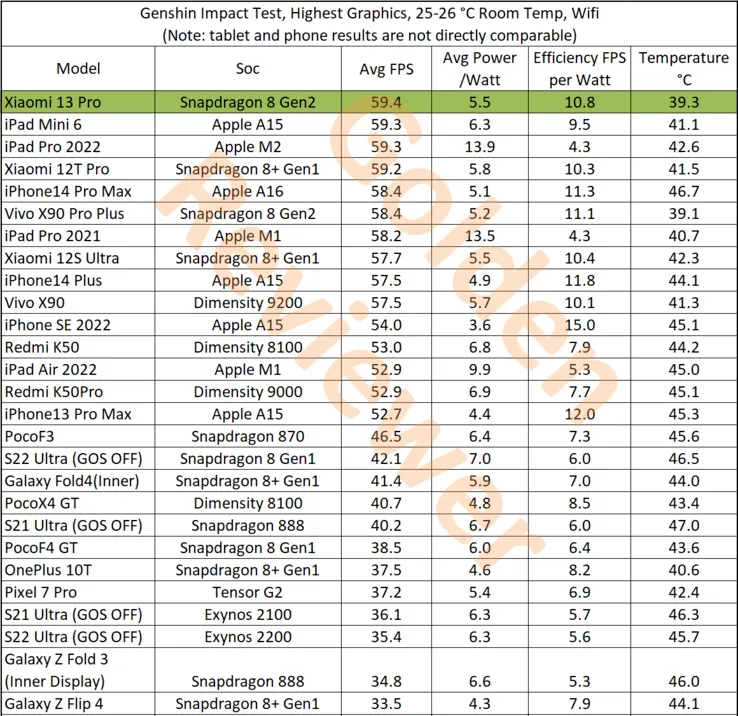
After making its debut in November, the new Snapdragon 8 Gen 2 is now slowly making its way into the market. The new Xiaomi 13 series is powered by the company’s flagship processor, and the Xiaomi 13 Pro has just been put to the test in a competitive gaming environment.
This test, conducted by Golden Reviewer on the well-known game Genshin Impact, demonstrates the Snapdragon 8 Gen 2 in the Xiaomi 13 Pro’s performance, which easily exceeds all competitors. The Xiaomi 13 Pro has the highest tested raw performance, averaging 59.4 frames per second (FPS). Comparatively, the Dimensity 9200 on the Vivo X90 achieves 57.5 FPS while the iPhone 14 Pro Max and its A16 Bionic accomplish 58.4 FPS.
With higher efficiency scores and lower power consumption than the Dimensity 9200, the Xiaomi 13 Pro and Snapdragon 8 Gen 2 also outperform it in terms of efficiency. However, the iPhone 14 Pro Max does have a slight edge in some areas. Most impressively, though, is that the Xiaomi 13 Pro achieves these performance benchmarks while remaining cooler than every other tested tablet. It only reaches a maximum temperature of 39.3°C. In contrast, the iPhone 14 Pro Max achieves a maximum temperature of 46.7°C, while a tablet like the iPad Pro 2022 only hits 42.6°C.
Don’t worry if you and your friends can’t decide whether iOS or Android is better for mobile gaming. Actually, there’s no need to pick one over the other since both operating systems support cross-platform gaming.
Spaceteam
The only game on this list that necessitates having all of your buddies in one location is Spaceteam.
You and your friends are the crew of a spaceship in the game Spaceteam, and everything is going wrong. You’ll need to communicate with one another by shouting various fictitious space commands in order to stay on course. As the speed and chaos increase, you all inevitably crash and perish while still receiving posthumous medals. But while it lasts, it’s enjoyable.
Download: Spaceteam for iOS | Android (Free, in-app purchases available)
The highly regarded Words With Friends sequel is more of an update.
There is also the standard Words With Friends experience, where you and a friend or online stranger take turns trying to score points on a board by spelling out words in the Scrabble style.
Words With Friends 2 does, however, add a few new modes for a different challenge while retaining everything you loved about the original game.
In the Lightning Round, two teams of five compete to determine who can reach a given score in the shortest amount of time. You can compete in Solo Challenge to compete against testing bots and win a virtual prize. Finally, Words With Friends Live interrupts your game with HQ Trivia-style questions.
Download: Words With Friends 2 for iOS | Android (Free, in-app purchases available)
Vainglory
Vainglory is a MOBA (Multiplayer Online Battle Arena) that is comparable to League of Legends and allows you to team up in 5v5 or 3v3 modes against real players or computer opponents.
To compete against another team and destroy their Vain crystal before they destroy yours, pick a hero from the more than 40 available. Destroy enemy turrets and minions as you move through the jungle using your special abilities and your team’s cooperation.
Teamfight Tactics
The auto chess game from Riot Games offers a competitive experience with well-known League of Legends heroes. With the goal of assembling the best squad, you draft and play champions.
Play normal or ranked matches with your friends while you discover the greatest item combinations and synergies thanks to complete cross-platform support. It’s also among the top PC games for multiplayer PvP!
The mobile version of Minecraft, which was first known as the Pocket Edition, is nearly identical to the PC version. The inability to use third-party servers or connect to third-party modifications is the only notable difference. Every time a new update for Minecraft is released, the mobile versions often follow later.
Having saying that, playing Minecraft on a mobile device is a great experience.
But playing Minecraft by yourself is boring. Any platform can play Minecraft, and because it is cross-platform compatible, you can play with your pals. Try out these tranquil gaming apps to help lower feelings of anxiety and stress if Minecraft doesn’t satisfy your need for exploration or provide enough space for calming world-building.
While playing trading card games in person is enjoyable, playing them online allows you to do actions like summoning demons and detonating booster packs.
The strategy game Hearthstone, created by Blizzard and set in the Warcraft universe, allows you to design decks, gather cards, and play matches with your friends. Although the game is free to play, you can purchase new card packs to offer yourself a benefit.
There are constantly reasons to play Hearthstone because of the game’s recurring expansions, competitions, and challenges. To raise your Rank, you can compete against strangers or your friends in the Arena.
Download: Hearthstone for iOS | Android (Free, in-app purchases available)
Pokémon Go
When it first came out, Pokémon Go broke the barrier between gaming and augmented reality by bringing virtual creatures into the real world. You and your buddies can go outside and explore with your smartphones, whether they are Android or iOS.
Download: Pokémon Go for iOS | Android (Free, in-app purchases available)
PUBG Mobile
The most well-known battle royale game in the world is playable on pretty about every platform imaginable, including iOS and Android.
Although Fortnite’s mobile app also satisfies this need, playing the game on Android and iOS calls for further procedures to enable cross-platform teaming. In contrast, PUBG Mobile provides an easy download for both Android and iOS smartphones. But PUBG Mobile unquestionably delivers this if you’re searching for an equally capable, event-ready rival.
Additionally, it’s one of the simpler phone games to play with your pals online because to its normal match times of around thirty minutes.
Download: PUBG Mobile for iOS | Android (Free, in-app purchases available)
Super Stickman Golf 3
Enjoy a short nine holes of golf before lunch with this easy-to-play but entertaining game.
Stickman Golf features two distinct multiplayer modes in addition to a fun Single Player option. In the Turn-Based mode, you can either take turns or compete to see who can play each hole the fastest in Race Mode. You can play offline or online as well.
Super Stickman Golf 3 can be downloaded from the developer’s APK file rather than straight from the Google Play store. Check out our description of what an APK file is and does if you’re not familiar.
Download: Super Stickman Golf 3 for iOS | Android – APK File (Free, in-app purchases available)
Old School RuneScape
Are you prepared to share your nostalgia with friends? Many players will have warm memories of RuneScape because it was one of the first widely available MMORPGs. You may continue your travels with all of your buddies in true crossplay fashion, whether you’re ready to mine, mine, or battle.
Download: Old School RuneScape for iOS | Android (Free, in-app purchases available)
League of Legends: Wild Rift
If you’re a fan of Riot Games’ League of Legends series, you couldn’t previously play with friends on a mobile device on the Rift. Despite the fact that League of Legends: Wild Rift does not support crossplay with PC players, Android and iOS users can queue up in pairs, trios, or a full five-person party as you aim for the enemy’s nexus. Now that Riot’s MOBA has launched on mobile devices, you can play a complete phone game with your friends.
Download: League of Legends: Wild Rift for iOS | Android (Free, in-app purchases available)
More games
So there you have it, a list of the top mobile cross-platform multiplayer games. With these tried-and-true games, you may download one that you and your friends can enjoy for a very long time. So, it’s just a quick install away if you want more entertaining mobile games to play with friends.
The “App Tracking Protection” feature of DuckDuckGo for Android has entered open beta and now enables all Android users to prevent third-party trackers across all of their installed apps.
The DuckDuckGo for Android app is a privacy-focused web browser, search engine, and data protection utility, downloaded over 10 million times from Google Play. It includes numerous privacy features, including search term anonymity, hidden tracker blocking, email tracker protection, auto-HTTPS, and one-tap browsing history clearing.
By preventing third-party tracking scripts in other Android apps that have been installed on the device, the “App Tracking Protection” attempts to increase privacy throughout the entire operating system.
‘It’s a free feature in the DuckDuckGo Android app that helps block 3rd party trackers in the apps on your phone (like Google spying in your weather app),’ stated DuckDuckGo today. ‘This means more comprehensive privacy and less invasive targeting.
The new version of App Tracking Protection allows Android users to see precisely which trackers are blocked and what kind of data they are seeking, in contrast to the prior close beta version of the service.
The feature is somewhat similar to Apple’s ‘App Tracking Transparency,’ but unlike the Apple feature, DuckDuckGo’s system does not depend on the app developers’ compliance with user choice.
Blocking all known trackers
According to DuckDuckGo, Android users have 35 apps installed on their smartphones on average, which results in 1,000–2,000 daily tracking attempts for more than 70 tracking organizations.
While consumers frequently use their devices to browse the web, play games, or check the weather, the App Tracking Protection guarantees to thwart all these attempts in the background.
Additionally, this blocking occurs with no discernible impact on device performance, which was enhanced in the most recent version of the app.
The blocking is based on a constantly updated and growing list of known trackers and is independent of the user’s choice in the associated tracking request dialogs usually served within apps.
To activate the new feature, the user has to open the DuckDuckGo app on Android, navigate to Settings → More from DuckDuckGo, and then enable App Tracking Protection, as shown below.
Activating App Tracking Protection
The function operates by setting up the DuckDuckGo for Android app on the device as a VPN, enabling the app to filter app traffic and block trackers.
However, unlike a conventional VPN, this is only used locally and does not offer anonymity when using the internet or connecting to other remote devices.
“App Tracking Protection uses a local “VPN connection,” which means that it works its magic right on your smartphone and without sending app data to DuckDuckGo or other remote servers,” explains DuckDuckGo.
Therefore, to enable the feature, DuckDuckGo will request the user allow the VPN connection to be created, which is required for the blocker to function as expected.
From then on, the app will regularly update the user with automatically generated summaries of blocked app trackers to give them an idea of what is happening behind the scenes.
Those who want to evaluate how threatening each app is to their privacy can use App Tracking Protection’s real-time view to see what trackers are loaded and blocked.
Although App Tracking Protection is a strong tool, users should be aware that it is still in the beta testing phase of development.
As a result, it could result in performance issues, incorrect operation of websites or apps, or the evasion of some trackers. You can turn off the feature if you experience any of these problems.