Tag: android

  • Redmi and Poco devices that will no longer receive HyperOS updates

    Redmi and Poco devices that will no longer receive HyperOS updates

    A few Redmi and POCO devices that Xiaomi has listed will no longer receive HyperOS updates. It is a typical change in the lives of Xiaomi smartphones. When some models reach the end of their existence, the corporation formally updates its EOL (end of life) list.

    The Chinese OEM is well-known for delivering upgrades for HyperOS to a variety of smartphones. It uses a distinct approach for each model, such as POCO and Redmi.

    In addition to four years of security fixes, Redmi and POCO phones are eligible for two or three major OS upgrades. The business then puts them on the EOL list.

    The tech giant has currently stopped supporting HyperOS updates for a few Redmi and POCO smartphones. Major software updates, monthly security patch rollouts, and basic enhancement patches will no longer be available for these models. Look at the phones listed below:

    Redmi Devices

    • Redmi Note 11 SE
    • Redmi Note 11S 5G
    • Redmi Note 11S
    • Redmi Note 11
    • Redmi Note 11 5G
    • Redmi 10C
    • Redmi 10 2022

    POCO Devices

    • POCO M4 Pro
    • POCO X4 Pro 5G

    As Xiaomi devices reach the end of their life cycle, software support is frequently discontinued. For customers that are already utilizing the EOL models, this procedure poses a problem. In this scenario, you can keep using the gadget without anticipating security upgrades or new features.

    With long-term software support, users can even move to a different model. Searching for unofficial upgrades like LineageOS is the last resort.

  • Limited-time free apps: discover the best free Android & iOS Games and Apps today!

    Limited-time free apps: discover the best free Android & iOS Games and Apps today!

    Freebies are great, especially when it comes to high-end apps and games. Developers give away paid programs and games every day as part of promotions; if you are quick, you can get your hands on these treasures for nothing. You will not want to miss the newest temporarily free iOS and Android applications and games that we have compiled in this blog. There is something for everyone here, from productivity enhancers to addictive games, so let us get started before the offers expire!

    These time-limited deals are an excellent opportunity to try out new games and applications without having to pay a dime. With these offers, you can try out a creative tool, increase your productivity, or play games without taking any chances. Additionally, even when the campaign is over, you can retain them once you have claimed them. But act quickly—these deals are only available today and will disappear tomorrow! Let us find out what is currently for sale.

    Android apps and games that are free for a limited time

    Android apps for productivity and lifestyle

    • PhotoApp AI ($6.49): You can call this a highly useful photo editor to modify your photos on your phone.
    • Touch Lock ($0.99): This app ensures that your screen remains locked, doing away with accidental touches.
    • Volume Scheduler: Auto Silent ($0.99): Want to make sure your phone is silent at a certain time? This app gets the job done, fuss free.
    • Xproguard Anti-Theft ($22.99): An app that claims to add another layer of security to your handset, discouraging theft and unauthorized access.
    • Binary Calculator Pro ($0.99): Enjoy this free mathematical calculator that is capable of adding, subtracting, multiplying, and dividing numbers in binary format.

    Free Android games

    • Hero of the Kingdom: Tales 2 ($6.49): It is time to play the heroic princess and save your city from a great evil.
    • SPHAZE: Sci-fi Puzzle Game ($0.99): A puzzle game that is set in a sci-fi setting that is lovely to look at even as you crack your brain.
    • Brain Game Find 5x ($3.49): Think you are smart? Why not tease your brain with this game that contains plenty of puzzles!
    • Shadow Hunter Offline Premium ($0.99): Here’s a horizontal hack-and-slash adventure game where you mow your way through endless enemies.
    • The Lost Treasure ($3.99): A point-and-click visual adventure game that requires you to solve puzzles and put two-and-two together along the way.

    iOS apps that are free for a short time

    iOS apps for productivity and lifestyle

    • Vostok – Story Maker ($0.99): If you want to create a collage from your photo album, this app might come in handy.
    • Filterious Photo Filters ($2.99): Want to spruce up your photos? Use this photo filter app.
    • Origami Paper Fold ($2.49): Should you have plenty of free time to spare, why not learn how to make some craft?
    • Bookends ($10.99): This reference management app will certainly come in handy for scholars and those doing research.
    • Tiny Planner ($19.99): Want an app to keep your life organized? Tiny Planner does seem to fit the bill perfectly.

    Free games for the iPhone and iPad

    • Command Word Jumble Complete ($4.99): Unscramble words, reveal hidden meanings, and basically take full advantage of your vocabulary.
    • Lyrica: Drunken Moon ($1.99): A music-based game that combines lyrics, making it a rather interesting gaming experience. 
    • The Lost Treasure ($3.99): A point-and-click adventure game with numerous places to explore as you search for pirate’s treasure.
    • King’s Hero: Turn Based Strategy ($1.99): A classical RPG with turn-based combat in the same vein as that of Heroes of Might & Magic.
    • Arcs ($1.99): 100 circular puzzles for you to solve, each of them offering more challenge than before.

    While snagging free apps and games is exciting, it’s important to stay vigilant to ensure a safe and positive experience. Always review the permissions an app requests before installation—if an app asks for access to data or features that don’t seem necessary, it’s better to skip it. Be cautious with apps that include in-app purchases, as they can lead to unexpected charges if not monitored, especially when children are involved.

    For families, consider enabling parental controls on your devices to restrict downloads and purchases. Take a moment to review app content ratings and ensure that they’re appropriate for young users. A little oversight can go a long way in making sure your free finds are both fun and secure.

    By staying mindful of these tips, you can enjoy the best free apps and games without compromising on safety. Happy downloading!

  • Snag for free these must-have free Android & iOS apps before they’re gone!

    Snag for free these must-have free Android & iOS apps before they’re gone!

    Who does not enjoy getting free downloads of premium apps? Developers occasionally give away their premium iOS and Android apps for a brief period of time. These offers may cover anything from picture editors and productivity tools to instructive materials and captivating games.

    The catch? You will need to move quickly to seize these undiscovered treasures while they are still available because these deals do not stay long!

    We have compiled a list of the top temporarily free apps that are now accessible for download in this post. There is something for everyone here, regardless of your preference for iOS or Android. Every app has been chosen with attention due to its excellent reviews, practicality, and overall worth. Now is your opportunity to improve your smartphone experience without breaking the bank.

    Android apps and games that are free for a limited time

    Android apps for productivity and lifestyle

    • Iris Light Flat 3D Icon Pack ($0.49): An icon pack that changes the way your Android handset looks like.
    • 90s Music Radio Pro ($0.90): Stream hit music from the 1990s with this unique app that shares culture from the previous century with the current generation.
    • Math Up to 100 ($2.49): This app recognizes handwritten input that makes it a more natural method of learning math, especially for the younger ones.
    • Matrix Determinant Pro ($0.49): Need a quick calculating app to figure out matrices? This app is a math calculator, which can calculate the determinant of a matrix.
    • How Much Can I Spend? ($2.99): Not everyone is a billionaire, so this app comes in handy to help you track your spending.

    Free Android games

    • WindWings ($0.99): A frenetic shoot ’em up that will require your reflexes to be at their very best.
    • Live or Die Survival Pro ($0.49): This game places you in dire straits, where you need to keep your wits about you to remain alive in the midst of a zombie apocalypse.
    • Tower Defense Legend 5 Pro ($0.49): A tower defense game that keeps you on the edge of your seat as endless waves of enemies bear down upon you.
    • Dungeon Corp. S ($1.49): A really wacky game set in an office environment where you encounter various monsters and vanquish them to level up.
    • Words & Cards Pro ($1.49): Just how many words can you find in a jumbled mess of letters in this game?

    iOS apps that are free for a short time

    iOS apps for productivity and lifestyle

    • The Wonder Weeks ($5.99): Keep track of your newborn baby’s development over the first few weeks with this app, making sure you never miss a moment.
    • Weather+ ($0.99): The weather can be a very fickle thing, so making sure you keep tabs on what’s happening outside helps you prepare everything better.
    • Resume Designer 3 ($3.99): Want to cobble up a resume on the fly? This app will help you do so.
    • mySymptoms Food Diary ($7.99): If you want to keep track of what you eat to make sure you don’t take in anything allergic, this can be helpful.
    • Good Grade ($2.99): A photo editor and color grading app that you can bring with you wherever you go.

    Free games for the iPhone and iPad

    • Vigil RPG ($2.00): A single-player premium RPG that is featured in 8-bit graphics, with interesting battles that require some important decision-making which will impact the story.
    • Dragon Flight Simulator Games ($1.99): Flying a plane is one thing, but flying a dragon? It doesn’t seem to be as easy as it sounds.
    • My City: Hospital ($3.99): Running a hospital is no child’s play, but you can let your child play with this hospital simulation game!
    • Pirate Drops 2 ($4.99): A match-3 puzzle game that features a pirate theme with fire and water elemental obstacles to boot.
    • Kingdom Rush: Tower Defense HD ($5.99): Hordes of enemies are knocking at your castle’s door. How will you repel them?

    The deals were live as of the publishing date. If you found an expired deal, please share it in the comments below. 

    Before you download one of the apps mentioned, we recommend that you check the details of the app in the Play Store or App Store. This is important because some of these free apps may have their own special features or disadvantages.

    Be careful with both free and paid apps, as they can hide in-app purchases and advertising. This is particularly significant when downloading games for children. To avoid unexpected problems, please follow the advice below:

    A small number of companies use devious methods to profit from your personal information in the rapidly changing world of mobile apps. We have some essential tips to assist you better safeguard your valuable data, so do not fear, fellow IT enthusiasts. When choosing which apps to download, you must be careful about the rights you provide them. Think about it: why would a basic alarm clock require access to your contact list or camera? Or why would a flashlight app need to know your precise location? You may greatly protect your personal information from unauthorized access by exercising caution when granting permissions.

  • One UI 7 rollout – will your Galaxy device get Android 15?

    One UI 7 rollout – will your Galaxy device get Android 15?

    Based on Android 15, Samsung’s One UI 7 represents a significant shift from their usual release timetable. The beta program ended after just one month, having been launched in December of last year. Samsung has now released further details about the One UI 7 rollout for Galaxy smartphones and tablets ahead of the release of the Galaxy S25. Find out which models will receive the update initially.

    One UI 7 will come to S series

    Samsung is trailing behind in the implementation of Android 15, which is bad for a company that generally sets the pace. Xiaomi and OnePlus have already released their updates, while Samsung appears to be taking its time. After launching last month, the One UI 7 beta ended last week, but what about the stable version?

    According to Samsung’s most recent press release, on January 22, 2025, the new Galaxy S models will receive the stable One UI 7 update. Translated, earlier flagships, such as the Galaxy S24, S23, S22, and S21, will have to wait their time, while the Galaxy S25 series is expected to come pre-installed with One UI 7. And those who own Galaxy S20s? I apologize, but Android 14 was the end of your life.

    Devices like as the Galaxy Z Fold 6, Galaxy Z Flip 6, and Galaxy Tab S10 Ultra are noticeably absent from the roadmap. With Samsung’s history, we will likely learn more after the Galaxy S25’s release, which is expected to come pre-installed with One UI 7. However, for the time being, there is a significant silence, which disappoints those who anticipate more frequent updates from Samsung.

    Other samsung Galaxy series?

    Although Samsung has not yet released an official list of Galaxy devices that will receive Android 15, we can speculate. Although the deployment for these smartphones is probably going to lag behind the flagship updates, One UI 7 should ultimately make its way to mid-range and budget models based on their software strategy.

    For now, we have put together a list of Galaxy tablets and smartphones that should get the upgrade, with an emphasis on models whose software support lasts until 2025 and beyond. Naturally, this list is merely conjectural and will be revised as soon as Samsung officially announces the lineup.

    Galaxy A series

    With Android 15, Samsung’s versatile Galaxy A series is about to receive a major update that will bring the newest features to these well-liked mid-range phones. This significant update is anticipated for many recent A series models as Samsung continues to fortify its software support policy. From better photography capabilities to more effective battery management, the new Android version promises to improve the well-balanced blend of features that fans of the A series adore. Android 15 will deliver a new wave of enhancements to keep your Galaxy A handset feeling powerful and up to date when combined with Samsung’s One UI 7 interface.

    • Galaxy A05s
    • Galaxy A06
    • Galaxy A14 4G
    • Galaxy A14 5G
    • Galaxy A15 4G
    • Galaxy A15 5G
    • Galaxy A16
    • Galaxy A24
    • Galaxy A25
    • Galaxy A33
    • Galaxy A34
    • Galaxy A35
    • Galaxy A53
    • Galaxy A54
    • Galaxy A55
    • Galaxy A73

    Galaxy S series

    Samsung’s flagship Galaxy S series is set to take the lead in getting the much awaited Android 15 and One UI 7 upgrade, carrying on the company’s custom of giving priority to its high-end smartphone portfolio. Owners of newer Galaxy S models can anticipate using Samsung’s improved One UI interface in conjunction with the newest Android improvements. It is anticipated that this update would further enhance the premium experience of the Galaxy S series by introducing cutting-edge security measures, improved performance optimizations, and enhanced AI capabilities.

    • Galaxy S21
    • Galaxy S21+
    • Galaxy S21 FE
    • Galaxy S21 Ultra
    • Galaxy S22
    • Galaxy S22+
    • Galaxy S22 Ultra
    • Galaxy S23
    • Galaxy S23+
    • Galaxy S23 FE
    • Galaxy S23 Ultra
    • Galaxy S24 FE
    • Galaxy S24
    • Galaxy S24+
    • Galaxy S24 Ultra

    Galaxy Z series

    • Galaxy Z Flip 3
    • Galaxy Z Flip 4
    • Galaxy Z Flip 5
    • Galaxy Z Flip 6
    • Galaxy Z Fold 3
    • Galaxy Z Fold 4
    • Galaxy Z Fold 5
    • Galaxy Z Fold 6

    Galaxy M series

    With Android 15, Samsung’s well-liked mid-range Galaxy M series is expected to get a significant update that will provide new features and enhancements to these reasonably priced gadgets. Samsung has remained committed to offering prolonged software support for the M series family, even though the precise rollout schedule may differ depending on the model. With improved energy management, enhanced speed, and new customization choices, this update promises to improve the user experience and revitalize your Galaxy M device.

    • Galaxy M14 / F14
    • Galaxy M15 / F15
    • Galaxy M34 5G
    • Galaxy M35
    • Galaxy M54 / F54
    • Galaxy M55 / F55 / C55

    Galaxy XCover series

    • Galaxy XCover 6 Pro
    • Galaxy XCover 7

    Galaxy Tab series

    With the next Android 15 upgrade, Samsung’s Galaxy Tab portfolio is poised to embrace the next evolution of Android and promises to revolutionize the tablet experience for users across all Tab models. It is anticipated that this upgrade will include tablet-optimized features that will improve productivity tools and multitasking abilities as tablets continue to gain significance for both work and play. Many current Galaxy Tab models, ranging from the high-end S series tablets to the more reasonably priced A series tablets, will get this important update as part of Samsung’s dedication to expanding software support for its tablet lineup. The goal is to provide an even more sophisticated and powerful tablet experience by combining the improvements of Android 15 with Samsung’s tablet-focused One UI 7 enhancements.

    • Galaxy Tab A9 / A9+
    • Galaxy Tab Active 4 Pro
    • Galaxy Tab Active 5
    • Galaxy Tab S6 Lite 2024
    • Galaxy Tab S8
    • Galaxy Tab S8+
    • Galaxy Tab S8 Ultra
    • Galaxy Tab S9
    • Galaxy Tab S9+
    • Galaxy Tab S9 Ultra
    • Galaxy Tab S9 FE / S9 FE+
    • Galaxy Tab S10+
    • Galaxy Tab S10 Ultra

    Besides the models listed above, all models released throughout 2024 should also be eligible for the Android 15 upgrade. This includes the entry-level models announced in the first week of the year, such as the Galaxy A05s, A15, and A25, and the recently unveiled Galaxy A06 and Galaxy A16.

    As in the past few years, we expect to see Samsung confirm its list of Galaxy phones and tablets eligible for the Android 15 update as soon as it starts updating the first model. The list is traditionally shared on the Samsung Members app with the expected timeframe for the update on the phone’s market. When that happens, we will update this list to follow the rollout, so be sure to bookmark this page and follow us on social media.

    As in previous years, as soon as Samsung begins upgrading the first model, we anticipate seeing the confirmation of its list of Galaxy phones and tablets that are eligible for the Android 15 upgrade. Traditionally, the list is made available on the Samsung Members app along with the anticipated release date for the phone. Make sure you bookmark this page and follow us on social media as we will update this list to reflect the launch.

  • Pixel perfect #deal: Pixel 8a at its lowest price ever

    Pixel perfect #deal: Pixel 8a at its lowest price ever

    Although Google’s New Year’s sale is officially over, some discounts are still available. Interestingly, the mid-range Pixel 8a with 128 GB of storage is still on sale online for $100 less, or 20% less than its normal $499 price. But the selection of colors is getting smaller.

    The base model of the Pixel 8a is available on Amazon in green, porcelain, and blue, while the black, obsidian model with 256 GB is also on sale, costing for $459 (down from $549). For the 256 GB model, Best Buy is providing the same discount.

    google pixel 8a

    Google Pixel 8a

    Google Pixel 8a is a reasonably priced substitute for the flagship Pixel 9. For those looking for a great camera and a pure Android experience without going over budget, the present deal makes it an even more alluring option.

    $499.00$399.00Buy from Amazon

    Why Pixel 8A is a great phone

    With its excellent feature-to-price ratio, the Google Pixel 8a is a reasonably priced substitute for the flagship Pixel 9. For those looking for a great camera and a pure Android experience without going over budget, the present deal makes it an even more alluring option.

    A lighter frame that feels more comfortable in the palm and softened corners for better handling are just two of the phone’s subtle but significant design improvements. It has a sleek, contemporary appearance thanks to its revised camera bar design, which closely mimics the high-end Pixel 8 flagship.

    How is Google Pixel 8A performing?

    The 6.1-inch OLED display on the front of the Pixel 8a is brighter than its predecessor, which makes reading outside simpler. A 120 Hz refresh rate is also supported by the panel, which guarantees more fluid scrolling and an improved gaming experience.

    Pixel 8a photos

    Another highlight is the camera’s performance. With the most recent Android 15 update, the Pixel 8a’s 64 MP primary camera and 13 MP ultra-wide lens have been optimized. Among the new AI-powered features are Add Me, which allows you to include the photographer in group photos, Super Res Zoom, which enhances zoom images, and greatest Take, which allows you to choose the greatest facial expressions from several shots.

    The device feels quick in terms of performance. It provides flagship-level processing performance and graphics capabilities thanks to the flagship-grade Tensor G3 chipset. The battery’s capacity has been somewhat improved, and wireless charging is a nice perk at this price range even though charging still only uses 18 watts.

    google pixel 8a

    Google Pixel 8a

    Google Pixel 8a is a reasonably priced substitute for the flagship Pixel 9. For those looking for a great camera and a pure Android experience without going over budget, the present deal makes it an even more alluring option.

    $499.00$399.00Buy from Amazon
    Pixel 8a specs
  • Temporary free apps and games for both Android and iOS

    Temporary free apps and games for both Android and iOS

    We have compiled a list of the most recent apps available on the iOS and Android platforms that have temporarily reduced their prices to $0.

    These temporary promotions allow you to purchase high-quality apps and gamges that typically have a price tag, such as top-rated games and premium productivity tools. Act quickly, though, as these offers will not last long, and you will lose your chance to download an app for free once it goes back to its normal price. Let us explore the must-have freebies of today that will improve your mobile experience.

    Android apps and games that are free for a limited time

    Android apps for productivity and lifestyle

    • Linea – Icon Pack ($1.49): If you want to spruce up your smartphone’s user interface, this is one icon pack that gets the job done.
    • 80s Music Radio Pro ($0.70): Stream hit music from the 1980s with this unique app.
    • AppLock Pro ($4.49): Keep your apps private with another layer of security. 
    • Fraction Maths Pro ($0.99): Need a quick calculating app to figure out fractions? This might be the app to do so.
    • Temperature Converter Pro ($0.99): No need to squeeze unnecessary brain power anymore in figuring out the temperature now.

    Free Android games

    • The Wordies Pro ($1.49): A relaxing word search game that helps you kill time without getting all stressed out.
    • Hero of the Kingdom: Tales 1 ($6.49): There is a looming dragon threat coming, make sure you prepare the villagers for it!
    • Survival Dungeon: Loot RPG Pro ($0.49): A mobile roguelike action RPG where you explore different dungeons and engage in battles.
    • Magnet Balls Pro Puzzle ($0.99): Remember Puzzle Bobble? This is something along the same lines, without cute dinosaurs.
    • Burning Sky VIP ($1.99): It is up to you to save the galaxy once again from endless waves of invaders from outer space.

    iOS apps that are free for a short time

    iOS apps for productivity and lifestyle

    • Strength Flight ($2.99): Want to bring your strength level to new heights? This app will hopefully help you be on that path.
    • Reverse Videos ($0.99): Here is a different video editing app where it basically does what it is named after – reversing videos.
    • Liftoff Workout Log ($4.99): Anything that can be measured, can be improved. Get better with your workouts by keeping track of them.
    • Hidgets ($2.99): View more health widgets on your phone’s home screen with this.
    • Loscil – Adrift ($2.99): This is a collection of 4 pieces of endless music by ambient musician loscil, where it relies on structured random selection that plays music continuously. 

    Free games for the iPhone and iPad

    • PicaSim ($2.99): Learn how to fly different aircraft with this game.
    • The Bug Butcher ($0.99): A side-scrolling shooter where you use your wits and reflexes to get rid of enemies.
    • Hack RUN ($2.99): Live the exciting (and perhaps glamorous?) life of a hacker with this game.
    • PuzzlAR: World Tour ($0.99): Join the navy, see the world? Nah, you can do so via this game now.
    • The Brilliant Kid ($1.99): An educational game for the little ones to keep them occupied.

    As of the date of publication, the deals were active. Please share any expired deals you come across in the comments section below.

    We advise you to review the app’s details in the Play Store or App Store before downloading any of the aforementioned apps. This is crucial as some of these free apps can have unique features or drawbacks of their own.

    Both free and paid apps should be used with caution because they may conceal advertising and in-app purchases. This is especially important while downloading kid-friendly games.

    In the quickly evolving world of mobile applications, some people use cunning tactics to make money by collecting and using your personal data. But do not worry, IT enthusiasts—we have some crucial advice to improve the security of your priceless data. When it comes to providing access for the apps you decide to install, it is important to remain vigilant.

    Why would a basic alarm clock require access to your contacts or camera? Alternatively, why would a flashlight app require your exact location? You may successfully protect your personal data from unauthorized access by carefully controlling the permissions you grant.

    Be sure to take advantage of these important opportunities! Even if these apps are free right now, they can suddenly and unexpectedly go back to their normal costs. Before downloading, make sure to read the app’s ratings and reviews. If you see something that strikes your eye, do not hesitate to take advantage of these offers.

    You may amass an outstanding library of premium apps without spending any money if you keep an eye out for these brief offerings. Developers often provide these time-limited promotions, so be sure to return again for new alerts about free apps. There has never been a better moment to upgrade your mobile device with high-quality, free software, regardless of your preference for iOS or Android.

  • Samsung Galaxy S25 Ultra: phone specs and cost

    Samsung Galaxy S25 Ultra: phone specs and cost

    The Samsung Galaxy S25 Ultra will raise the bar for performance and mobile cameras. While the boxy Note design is being phased out, the business has made significant design revisions. According to recent reports, the next Ultra flagship would feature remarkable camera capabilities and performance enhancements.

    Based on the leaks and rumors that have surfaced over the past few months, you can investigate the Samsung Galaxy S25 Ultra characteristics.

    Samsung Galaxy S25 Ultra: phone specs and cost

    Samsung Galaxy S25 Ultra specs

    DesignFrame – Titanium

    Front and Rear – Corning Gorilla Armor (2nd-gen)

    IP Rating – IP68
    DimensionsHeight – 162.82mm

    Width – 77.65mm

    Depth – 8.3mm

    Weight – 219g
    SoftwareAndroid – 15

    One UI – One UI 7.0

    Future upgrades – 7 generations of OS upgrades and security updates
    DisplaySize – 6.9-inch (6.86-inch)

    PPI – 505 PPI

    Resolution – 3120 x 1440 (WQHD+)

    Panel – Dynamic LTPO AMOLED 2X

    Refresh rate – 1-120 Hz

    Brightness – 2600 nits
    ChipsetQualcomm Snapdragon 8 Elite for Galaxy (3nm)

    Qualcomm Oryon CPU

    Qualcomm Hexagon NPU

    Snapdragon X80 Modem-RF System

    Adreno GPU
    Memory12GB RAM, 256GB Storage

    12GB RAM, 512GB Storage

    12GB RAM, 1TB Storage

    16GB in Select Markets

    UFS 4.0
    Rear CameraWide – Main: 200MP, f/1.7, OIS (1/1.3″, 0.6um)

    Ultra Wide – Ultra Wide: 50MP, f/1.9, 120-degree FoV

    Telephoto – 10MP OIS with 3x optical zoom

    Periscope – 50MP OIS with 5x optical and 10x optical quality zoom, Digital Zoom up to 100x)

    Flash – Yes

    Video – 8K at 30fps, 4k at 120fps

    Auto Focus, Optical Image Stabilization (OIS),
    Front Camera12MP Front Camera (F2.2, FOV 80-degree)
    Network2G GSM – GSM850,GSM900,DCS1800,PCS1900

    3G – B1(2100),B2(1900),B4(AWS),B5(850),B8(900)

    4G FDD LTE – B1(2100),B2(1900),B3(1800),B4(AWS),B5(850),B7(2600),B8(900),B12(700),B13(700),B14(700),B18(800),B19(800),B20(800),B25(1900),B26(850),B28(700),B29(700),B30(2300),B66(AWS-3),B71(600)

    4G TDD LTE – B38(2600),B39(1900),B40(2300),B41(2500),B48(3600)

    SIM Slot Type – SIM 1 + eSIM / Dual eSIM

    5G FDD Sub6 – N1(2100),N7(2600),N25(1900),N28(700),N66(AWS-3),N71(600)

    5G TDD Sub6 – N257(28GHz),N258(26GHz),N260(39GHz),N261(28GHz)

    5G TDD mmWave – N41(2500),N78(3500)
    ConnectivityWi-Fi – Wi-Fi 7

    USB – 3.2

    Bluetooth – 5.3

    Location Technology – GPS,Glonass,Beidou,Galileo

    Wi-Fi Direct – Yes

    NFC – Yes

    PC Sync – Smart Switch

    USB Interface – Type-C
    Battery5000mAh (supports 45W wired charging)
    AudioSupported Formats – MP3,M4A,3GA,AAC,OGG,OGA,WAV,AMR,AWB,FLAC,MID,MIDI,XMF,MXMF,IMY,RTTTL,RTX,OTA,DFF,DSF,APE
    VideoSupported Formats – MP4,M4V,3GP,3G2,AVI,FLV,MKV,WEBM

    Video Playback Resolution – up to UHD 8K at 60fps
    ColorsTitanium Black, Titanium Blue, Titanium Gray, and Titanium Silver

    Price and release date

    According to Samsung’s official Unpacked teaser, the Galaxy S25 series will go on sale on January 22, 2025. The next Galaxy S25 Ultra will come with three memory configurations with UFS 4.0 technology and 12GB or 16GB of RAM (depending on the market).

    In the US, a smartphone with 12GB RAM and 256GB of storage might cost $1299, while a 1TB model could cost an incredible $1659. According to a reliable source, some European countries will not raise prices.

  • Top 4 compact smartphones to check out in 2024

    Top 4 compact smartphones to check out in 2024

    Smartphones come in many shapes and sizes, but choosing a good smartphone that is also tiny is a little more difficult.

    Smaller phones have traditionally been concentrated on the low end of the market because smaller displays are less expensive to manufacture, but we have seen a rebirth of small phones in the luxury end of the market in recent years with the likes of the Samsung Galaxy S24 and Asus ZenFone 10.

    However, it remains challenging to find a smartphone that is both tiny and provides a satisfying smartphone experience. That is why we thoroughly benchmarked each option on our list, with our reviewers switching SIM cards and transferring all apps and data to test real-world performance.

    We take into account screen size, dimensions, and weight, in addition to the usual performance, camera, and battery testing that we do with all smartphone reviews, and we have divided our list into categories – best small Android, best small mid-ranger, and more – to make the decision easier.

    It is definitely worth noting that our official definition of a small phone is one with a maximum display size of 6.1 inches; nevertheless, if there are any exceptions to this criterion in our selection below, we will make sure to explain why. If you have changed your mind and are now tempted by something a little larger, check out our list of the top smartphones and Android phones for more ideas.

    If you need a little phone but want to continue with Android, the Asus ZenFone 10 is your best option. It is not quite as little as the iPhone 13 mini, with a 5.9-inch 120Hz OLED display, but it is still modest in comparison to other Android flagships, which have 6.7- or even 6.8-inch displays. And, like with the iPhone 13 mini, do not be fooled by its diminutive size; this is a flagship smartphone with blockbuster specs.

    That contains the latest and greatest Qualcomm CPU, the Snapdragon 8 Gen 2, as well as 8GB or 16GB of RAM and up to 512GB of UFS 4.0 storage, allowing the ZenFone 10 to handle everything you throw at it with ease. Gaming was also enjoyable on the small phone, which managed to stay cool even throughout extended gameplay sessions.

    There is also excellent camera performance from a 50MP main and a 13MP ultrawide, particularly in terms of image stabilisation, and a 32MP RGBW selfie camera produces some of the best selfies we have seen this year. What actually distinguishes the ZenFone 10 from the competition is its highly customizable approach to Android 13.

    You may either use Asus’ ZenUI skin or something very similar to pure Android, with Material You and other UI customization options. It outperforms almost every other Android OEM, making it a pleasure to use on a daily basis. Add in a comfortable all-day battery life with a 4,300mAh cell, and you have got a fantastic tiny Android smartphone that will not break the bank.

    The Asus ZenFone 10 remains the smallest flagship Android smartphone available, but the Samsung Galaxy S24 is not only more powerful, but also has a larger screen in a body that is only slightly larger than the ZenFone’s.

    The 6.2-inch Dynamic AMOLED 2X screen is somewhat larger than last year’s 6.1-inch panel, but do not worry; this is feasible because Samsung reduced the screen’s bezels, leaving the form factor nearly equal to its older sister. That means it is not only larger while preserving a compact form factor, but it also has high-end features like an LTPO-enabled 120Hz refresh rate, HDR10+ support, and a maximum brightness of 2600nits.

    It gets a little confused in the chipset sector, with the Exynos 2400 chipset available in the UK, Europe, and other regions, yet the Snapdragon 8 Gen 3 for Galaxy is available in the United States.

    We evaluated the former, but we benchmarked the latter, and it is evident that the Snapdragon-equipped edition outperforms in GPU tests, but you will not notice a difference in regular use. It is fast and responsive, and it makes use of GenAI capabilities to deliver on-device translation, voice recording transcription, and other features. That could only get better with its improved seven-year OS upgrade cycle, which is the longest of any small-screen phone now available.

    The only disappointment is camera performance; while it is far from a bad camera setup, consisting of a 50MP main, 12MP ultrawide, and 10MP telephoto, it is been unchanged for the third year in a row, and as a result, there are more powerful options on the market – though many of these are attached to larger screens like Samsung’s own 6.8-inch Samsung Galaxy S24 Ultra.

    Still, if you are seeking for a reliable small-screen flagship that can handle just about anything, the Galaxy S24 is a compelling alternative.

    What if your budget does not cover flagship-level devices like the S24 or ZenFone 10? The Google Pixel 8a is our top pick for tiny smartphone aficionados on a tight budget.

    The Pixel 8a measures 6.1 inches, has a smooth 120Hz refresh rate, and uses Actua technology from the flagship Pixel 8 to improve brightness to 2000nits. It is also a lovely, compact size that feels well in the hand, especially with the Pixel 8a’s rounded corners.

    The Pixel 7a flexes its mid-range muscles in the camera department, where it uses the flagship-level Tensor G2 chipset to power a variety of AI features such as Super Res Zoom and Night Sight, as well as exclusive photo editing features that remove background distractions and sharpen blurry images.

    That AI goodness extends to the overall experience, with the Pixel 8a’s stock Android 14 littered with useful AI features to improve your day-to-day, from displaying upcoming calendar invites and the weather on the Home screen to Recently Played, an AI feature that detects music in your surroundings as you go about your day – a real boon for music discovery.

    The battery life is also good, but it is still only a one-day gadget, which is one of the drawbacks of more compact smartphones. Still, if you want a tiny phone on a cheap, the Google Pixel 8a in 2024 is the best option.

    If you are seeking for a really compact Android smartphone with a large-screen experience, a solid camera, powerful performance, and an all-day battery life, the Motorola Razr 50 Ultra (or Razr+ 2024 if you are in the US) is the best option.

    While the main 6.9-inch 165Hz pOLED panel is far from small, it outperforms some of the largest smartphones on the market. When folded, the external display measures only 4 inches. This is ideal for one-handed use because all corners are easily accessible with just your thumb.

    Not only is the external screen small yet highly functional, but the handset itself is only 15mm thick when folded, making it easy to sneak into your pocket or purse. You will not have to worry about scratches because the display is protected by Gorilla Glass Victus.

    Aside from the screens, the Razr 50 Ultra has two updated back cameras: a 50MP main and a 50MP 2x telephoto, with the latter replacing the ultrawide lens on the previous generation model. We were generally pleased with the new lenses’ performance, albeit the phone struggled with difficult photos such as brilliant sunsets, and HDR performance was occasionally hit-or-miss.

    The phone features the Snapdragon 8s Gen 3 chipset, which, while not Qualcomm’s most recent engine, is nonetheless powerful and performed well in our CPU and GPU benchmark tests when compared to the foldable competitors, with no significant differences in everyday use.

    Whether you want the tiniest smartphone possible or simply want to recreate the flip phone experience of the noughties, the Motorola Razr 50 Ultra is an excellent choice for the majority of people.

  • True variable refresh rate support for Android 15 is here

    True variable refresh rate support for Android 15 is here

    These days, swift screens are not limited to the the greatest Android phones. The majority of premium and mid-range Android phones, as well as many low-cost phones, have displays with refresh rates higher than 60 Hz.

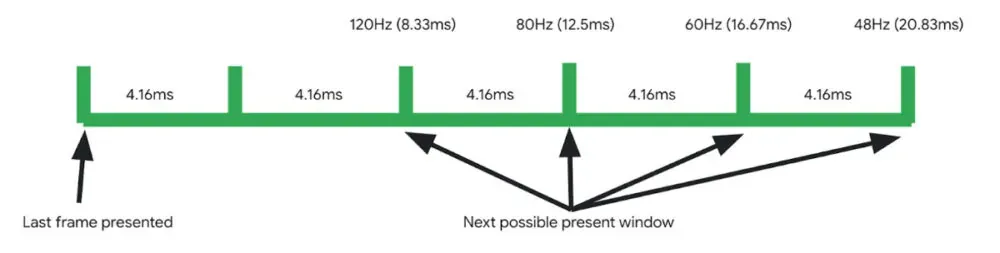
    However, because their displays do not support variable refresh rate (VRR) technology, the majority of these phones only refresh at a few set speeds, such as 60Hz, 90Hz, or 120Hz. As it turns out, Android has not had real VRR support up until now, although certain phones do feature VRR-capable screens.

    Google claims that Android 15 is the first version of the Android operating system to feature adaptive refresh rate (ARR), also known as variable refresh rate. The operating system allowed for multiple refresh rates with refresh rate switching prior to Android 15. In essence, the OS would instruct the screen to alternate between the many display modes that it supported, like 1080p@60Hz and 1080p@90Hz.

    Therefore, it would track the type of view that is displayed in an attempt to do this intelligently, but it was never really adaptive. Nevertheless, Android 15 introduced adaptive refresh rate, which allows the refresh rate to alter within a single display mode in addition to adapting to the content frame rate.

    According to Google, there are two main advantages to Android 15’s adaptive refresh rate functionality. By allowing devices to “function at rates lower than their maximum refresh rates, switching to higher rates only when critical for the user experience, which eliminates wasteful power consumption,” it first lowers power usage. Second, by removing the need to switch between display modes—which Google claims is a “known cause for jank”—ARR enhances performance.

    android 15 variable refresh rate

    Many of you are probably asking if this adaptive refresh rate feature is indeed new. What gives, considering that smartphone manufacturers have been promoting variable refresh rate as a key feature made possible by the advent of LTPO screens for years? Although I am not very knowledgeable about display technology, from what I gather, even these gadgets have never offered full VRR on Android, unlike PC players. For instance, unlike many PCs, Android smartphones with LTPO OLED screens are unable to synchronize their display refresh rates with games.

    Many of you are probably asking if this adaptive refresh rate feature is indeed new. What gives, considering that smartphone manufacturers have been promoting variable refresh rate as a key feature made possible by the advent of LTPO screens for years?

    While We aren’t very knowledgeable about display technology, from what I gather, even these gadgets have never offered full VRR on Android, unlike PC players. For instance, unlike many PCs, Android smartphones with LTPO OLED screens are unable to synchronize their display refresh rates with games.

    Rather, the introduction of LTPO backplanes to OLED screens just improved the power efficiency of operating those screens at lower refresh rates. This expanded the range of available refresh rates by enabling Android devices with LTPO OLED displays to operate at 1Hz or even 10Hz when necessary.

    These refresh rates were still connected to distinct display modes, though, and Android controlled them by calling lower-level display software through the Hardware Composer (HWC) hardware abstraction layer (HAL). As a result, the Android OS would alter the refresh rate by switching the display mode even on devices having a real VRR/ARR panel.

    Some Android devices already have the ability to switch refresh rates inside the same display mode, but their OEMs had to add kernel-level support for this, according to display expert Dylan Raga.

    The drawback of this strategy is that every OEM would have to create their own logic for determining when to reduce the refresh rate. This is difficult not only because Android requires a generic kernel image, but also because the kernel does not know as well as the OS does what content is displayed.

    Because it offers a uniform method of reducing the refresh rate using data and cues that are more easily accessible to the OS, Android 15’s implementation of appropriate support for VRR/ARR at the HAL level is crucial. However, OEMs must implement version 3 of the HWC HAL APIs in addition to supporting the necessary kernel and system updates on Android 15 or later devices in order to allow VRR/ARR.

    It is hoped that more apps would utilize lower refresh rates once Android devices have this adaptive refresh rate capability enabled. Dylan Raga cited the fact that most Android phones now run at 60 Hz when a movie is playing rather than 30 or 24 Hz, which this feature may correct.

    Yet, according to Google’s documentation, this functionality only permits the panel to operate at refresh rates that are “divisors of the panel’s tearing effect (TE),” therefore it is unlikely to bring PC-like game refresh rate syncing to Android. It is long overdue that Google disclose more information about this function and whether it is available on any of its current Pixel smartphones.

  • Officially, these seven Motorola phones will get Android 15.

    Officially, these seven Motorola phones will get Android 15.

    There has been a lot of interest in determining which firms would be the first to update their phones to the latest version of Android, as well as which phones will be included, since the official release of Android 15 on October 15. Motorola most recently stated that the Android 15 update will be applied to a few more devices.

    Motorola has started updating support pages for its devices and verifying Android 15 upgrades in this manner, despite the fact that the company has not made any official pronouncements about its plans for Android 15. Motorola has now announced that the following handsets will receive Android 15 as part of this most recent batch of updates:

    It is heartening to see Motorola continuing to expand its network of Android 15 updates, even though only one of those phones—the Edge 2023—is accessible in the United States. Updates for Android 15 were confirmed for a far wider range of other Motorola phones, such as the Razr (2024), Razr Plus (2024), Edge (2024), and others, this past October. Motorola began its upgrade process by releasing the Android 15 beta to the Edge 50 Fusion shortly after the first list was found.

    motorola android 15 update

    There is a lingering asterisk, even if more Motorola phones are receiving Android 15. When Android 15 will be formally available on any of Motorola’s smartphones is yet unknown. Furthermore, Motorola has a reputation for being among the slowest firms to offer timely Android upgrades. Therefore, even though Android 15 for other Moto phones is fantastic, it can take some time for your device to receive the update.