Tag: ios

  • Xiaomi HyperOS 3.1 update brings major new features — here’s what to know

    Xiaomi HyperOS 3.1 update brings major new features — here’s what to know

    On January 22, 2026, Xiaomi launched the HyperOS 3.1 beta, which included minor but significant UI and privacy improvements. Phones become smoother and speedier as a result. Additionally, the HyperOS 3.1 update uses AI to extend battery life.

    With improved app switching and adjustable settings, it improves the user interface. Additionally, it offers improved multitasking, smoother animations, and increased privacy and security.

    A more reliable, refined, and connected experience is provided by HyperOS 3.1. It also offers support for iOS calls and security updates for Android 16. Let’s examine the characteristics of HyperOS 3.1 in more detail below:

    Quick look at Xiaomi HyperOS 3.1 features coming to your device

    CategoryFeatureExplanation
    iOS IntegrationAirPods Native Pop-UpLet users hide unlock pattern traces
    iOS IntegrationSpatial Audio SupportEnables 360-degree immersive audio on Xiaomi phones
    iOS IntegrationANC & Transparency ControlManage noise cancellation and sound modes easily
    iOS IntegrationFind My AirPodsLocate lost AirPods without needing an Apple ID
    UI & AnimationsNew System AnimationsSmoother, more fluid transitions across the system
    UI & AnimationsiOS-Style Recent AppsCard-like multitasking view inspired by iOS
    Apps OverhaulNew Gallery & Weather AppsFaster apps with rewritten code for better performance
    AccessibilityNew “Assistance” MenuEasier access to vision, hearing, and control tools
    AccessibilityActive Visual PerceptionHelps users better understand on-screen content
    Motion & ComfortMotion Sickness FeatureReduces visual motion to prevent dizziness
    Super IslandLive Update SupportReal-time updates from apps like Uber and Spotify
    Super IslandTodo Notes & QR AccessView tasks, QR codes, and maps directly on Island
    Lock ScreenCard Swipe SupportSwipe payment and transit cards on lock screen
    MediaMusic Progress BariOS-style glowing progress bar on media player
    EcosystemXiaomi + iPhone Call SupportAnswer Xiaomi calls directly on an iPhone
    System CoreBiometric RedesignImproved fingerprint and unlock settings
    System CoreQuick GesturesFaster gesture shortcuts on select premium phones
    SecurityNew Password AppStores passwords, Wi-Fi logins, and passkeys
    SecurityPassword Breach AlertsWarns if your passwords are compromised
    PrivacyShake Permission UpdateLimits app access to camera, mic, or location
    PrivacyHidden Pattern TrailLets users hide unlock pattern traces
    PerformanceFaster & Smoother SystemImproved speed and stability
    BatteryAI Battery OptimizationSmarter power saving using AI
    Android CoreAndroid 16 Security PatchesLatest system-level security improvements

    iOS integration

    You may have overlooked many Apple-only features if you have Apple AirPods and a Xiaomi phone. The AirPods’ battery level was visible before the introduction of Xiaomi HyperOS 3.1. Similar to Apple AirPods, Xiaomi phones have developed as a local brother that will never be alone.

    Important improvements like Apple-like native Pop Up support are included in the latest version of HyperOS 3.1. A brief card with details about the battery and connectivity now appears on your screen when you open the AirPod

    Spatial Auido, one of Apple’s most exclusive features, is now accessible. Users of Xiaoimi can now enjoy native 360-degree immersive audio. Additionally, the HyperOS club allows you to control the connection time, ANC, and Transparency mode.

    Additionally, instead of displaying the standard Bluetooth icon, it only displays the appropriate AirPods model icon. Notably, Xiaomi’s “Find My” Integration allows you to locate your misplaced AirPods using Xiaomi Online Search without even requirin

    New UI animations

    Xiaomi rewrites Gallery and Weather and changes its animations. To enhance system performance, all outdated code has been eliminated. The new APK files will crash when installed on older HyperOS 3 devices as a result of this modification.
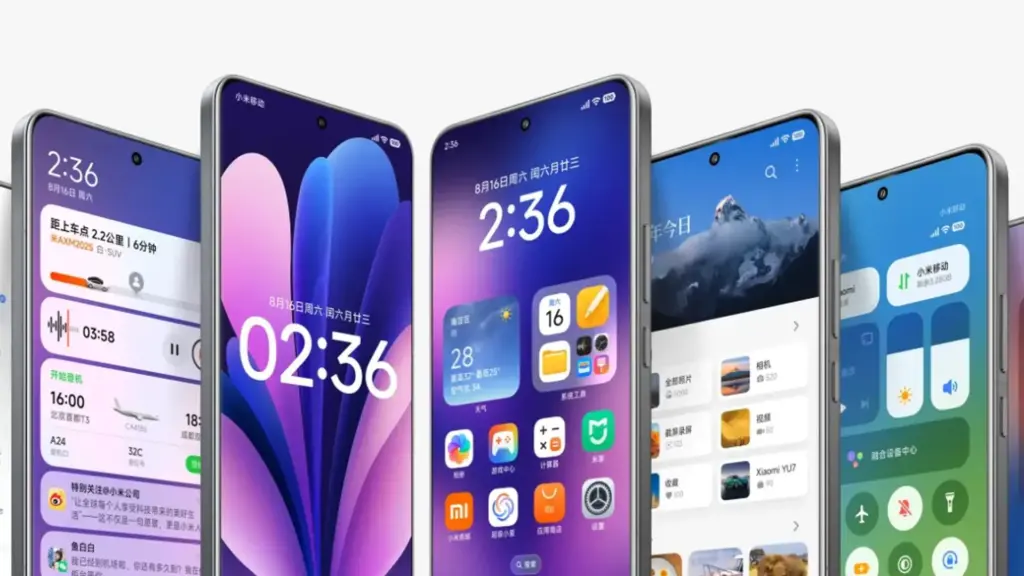
    Additionally, the company imitated the latest iOS 26 app animation. Switching between programs feels more contemporary because to the new style, which resembles the iOS cards.

    Improvements have been made to the white bar at the bottom of the screen that indicates when you are in full-screen mode. It now responds better to touch and moves more fluidly.

    HyperOS 3.1 now has a new Motion Sickness function from Xiaomi. Motion sickness-causing visual motion cues are lessened by this featur

    Improved Super Island

    Although Super Island now uses the native Android 16 “Live update” API, it was completely inspired by iOS Dynamic Island. Thus, Xiaomi-specific code will no longer be required for international apps such as Uber, Spotify, or other food delivery services to display real-time information on Super Island
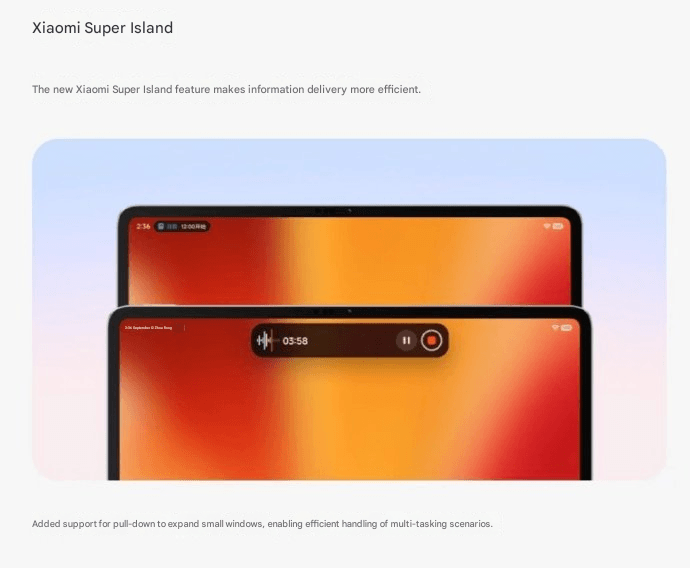
    Following this upgrade, Xiaomi added a Todo Notes feature. You no longer need to open the app landing page in order to view a variety of notifications, QR codes, and map instructions in Island. Additionally, a function known as Lock Screen Card Swipe is added. This makes it simple to swipe through your cards, including transit and payment cards, directly on the lock screen. You won’t have to visit a different wallet website.

    The new Music Progress Bar, which was completely lifted from iOS, is one of my favorites. The media player on the island now has a glowing progress bar thanks to a straightforward yet lovely modification.

    System Core enhancements

    The “Assistance” Menu functionality was implemented in HyperOS 3.1 (Accessibility Settings Change). This indicates that Xiaomi renamed and relocated the accessibility options to a new main menu called “Assistance.” Those who require simpler phone controls or who have vision or hearing issues can benefit from these options.

    Features, for instance, relocated there. Active Visual Perception improves the clarity of what users see or comprehend on the screen. Screen readers, text size control, and tools for hearing and vision assistance.

    Additionally, the new biometric area offers a more contemplative experience. Additionally, Xiaomi included Quick Gestures control, which is only available on more recent high-end models like the Poco F8 Ultra and Redmi K90 Pro Max.

    As I have stated, deep ecosystems are greatly impacted by Apple AirPod integration. Additionally, the most crucial brick is iPhone Cross-Compatibility (Xiaomi + iPhone). You can now answer and receive calls from your Xiaomi phone directly on your iPhone if you have both an iPhone and a Xiaomi phone. To put it simply:

    When your Xiaomi phone calls, you may answer it on your iPhone. Thus, you don’t always need to touch your Xiaomi phone. Since Apple and Xiaomi often don’t collaborate closely, this function is unique in that it links two competing ecosystems.

    Many security improvements
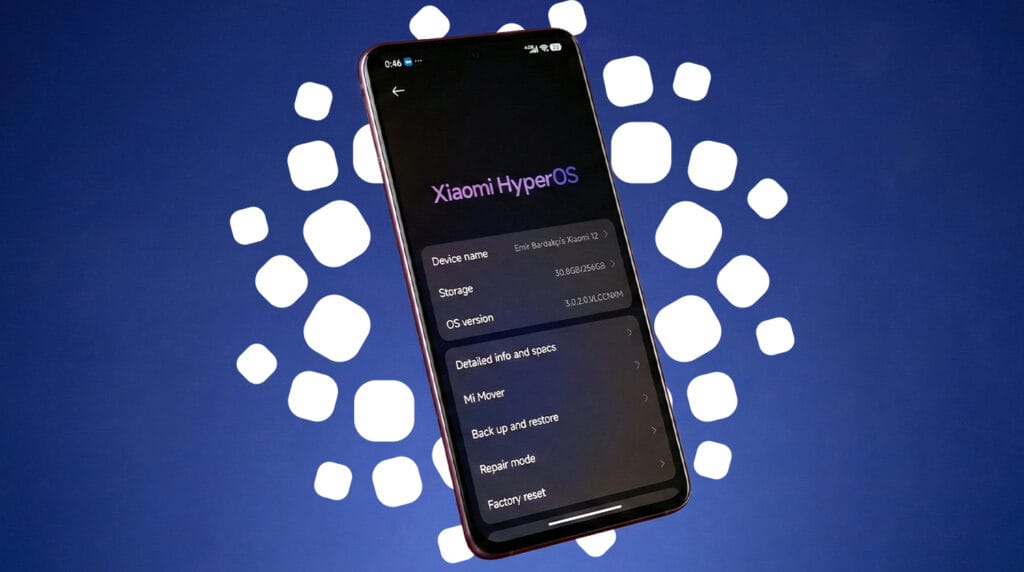
    hyperos 3.1 security updates

    The Passwprd App, similar to iOS, is now one of the key features of HyperOS 3.1. Similar to Apple, this new tool helps you manage your Wi-Fi passwords, passkeys, and app logins.

    It can detect and alert you if your passwords have been stolen. Additionally, it allows you to manage all of your passwords in one location by combining them from several online browsers. Additionally, it offers a simple method for your passwords to be automatically filled in throughout the system.

    The way you can use patterns and fingerprints has changed in the latest release. The pattern trace can now be concealed once more. Additionally, it is now simpler to select your security options because the fingerprint unlock is independent of the private password settings.

    Shake Permission Update is a new function that allows you to modify your privacy. This enables you to restrict access to your location and camera, for example, only when your screen is on. Additionally, you have the option to restrict these permissions to eight seconds following the opening of an application. By doing this, you can stop apps from following you when you’re not
    xiaomi hyperos 3.1 update

    Overall, HyperOS 3.1’s improvements prioritize polish over a significant redesign, enhancing ecosystem connectivity, privacy, battery efficiency, and smoothness. This beta seems more polished, reliable, and prepared for the future than earlier HyperOS iterations thanks to Apple-inspired features and Android 16 security improvements.
  • HyperOS 3: Xiaomi Confirms Poco Phones Eligible for the Android 16 Update

    HyperOS 3: Xiaomi Confirms Poco Phones Eligible for the Android 16 Update

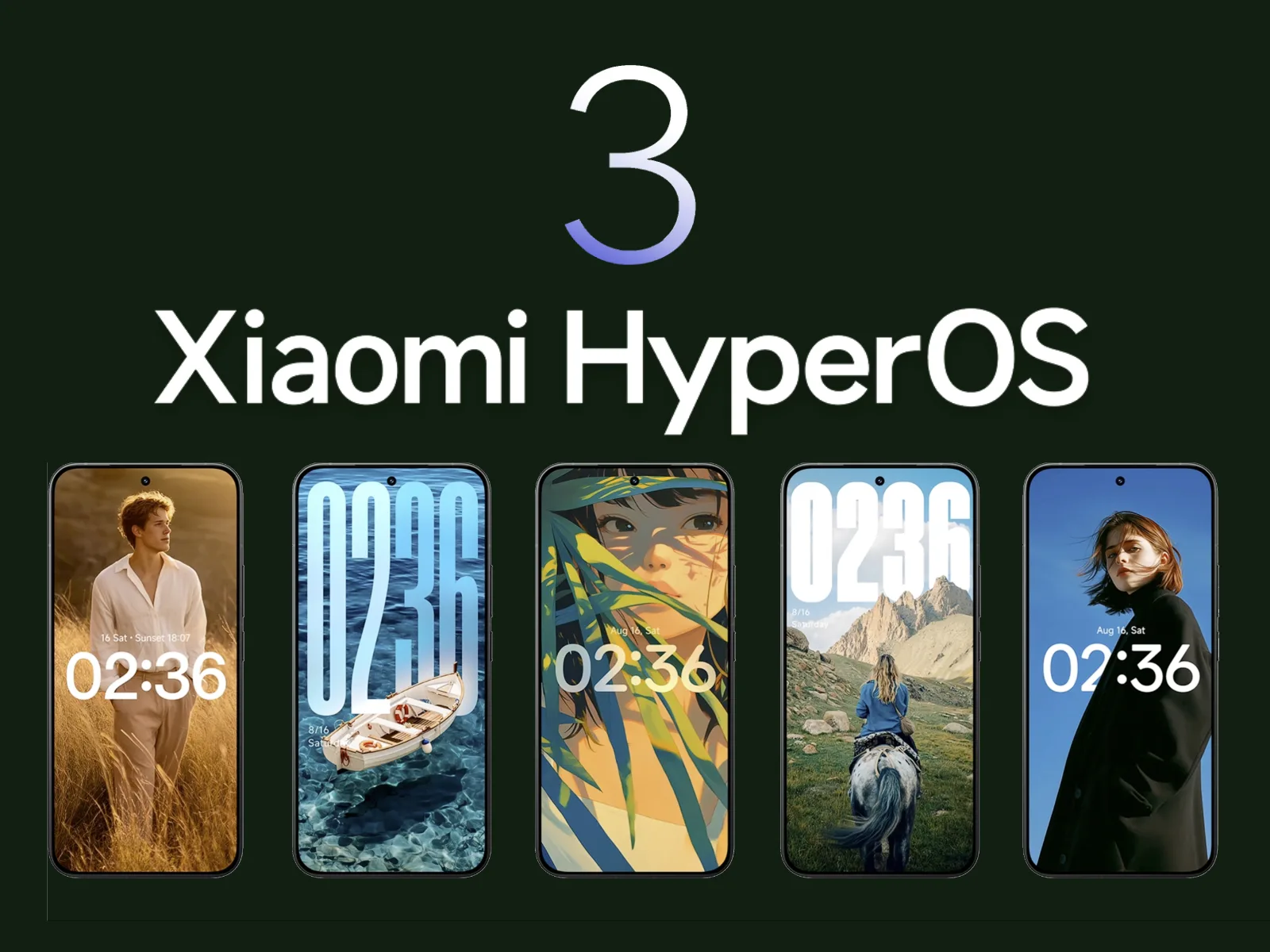
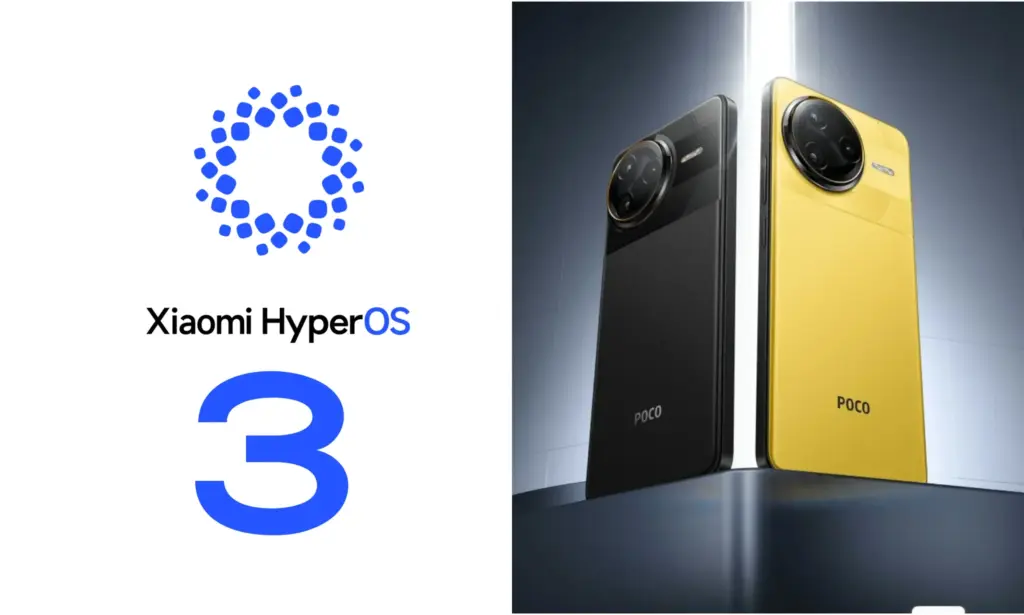
    Xiaomi is closing out the year with fresh Poco flagships and a huge HyperOS 3.0 update based on Android 16. From new phones to a revised UI, here’s what’s rolling out and when you can expect it on your smartphone.

    Xiaomi has more phones to release this year. The worldwide versions of the Poco F8 Pro and F8 Ultra were just released. The company has revised the HyperOS 3.0 deployment schedule, which is now expected to reach over a dozen Poco phones and tablets, in tandem with the surge of new hardware.

    The new Poco F8 Pro and Poco F8 Ultra flagships ship with Android 16 out of the box. Other models will be released on a staggered schedule.

    Xiaomi Confirms Poco Phones Eligible for the Android 16 Update

    Which Poco devices are confirmed to get HyperOS 3.0

    For the initial group of Poco devices, the deployment started in October and will last until the end of November. The Poco F7 and X7 series from the previous year, including its Ultra variants, are at the top of the list. Some users outside China have already reported receiving the software. However, it’s not uncommon for other devices to only receive notifications in the upcoming days, depending on variations.

    The Poco F6 (Pro), Poco X6 Pro, Poco M7, Poco M6 (Pro), and Poco C75 will lead the following batch in December.

    Between December 2025 and March 2026, a broader release that includes the Poco F5 (Pro), Poco X6, Poco M7 Pro, and Poco C85 is scheduled. Poco’s Android tablets, such as the Poco Pad, Poco Pad X1, and Poco Pad M1, will join these. Regretfully, Xiaomi has not disclosed the timing for every device.

    What’s new in HyperOS 3.0?

    HyperOS 3.0 is built on Android 16, which adds its own set of new features and customizations. Xiaomi’s version offers a substantial user interface overhaul, increased security, and superior optimization for longer battery life and smoother performance.

    The most noteworthy graphic modification is Super Island, inspired by iOS’s Dynamic Island. As a native feature of Android 16, it is integrated into the punch-hole camera region and shows live updates and dynamic widgets.

    The main UI has also been overhauled with transparent parts, blurred backgrounds, and redesigned app icons. Users receive new styles on the lock screen, like as live effects and AI-generated wallpapers.

    Additionally, Xiaomi promises enhanced usability and performance. Multitasking and app switching are stated to be snappier, while overall responsiveness is quicker.

    Permission limits and improved data protection have improved security. In other areas, HyperOS 3.0 provides closer connection with Xiaomi’s wider range of products.

  • Get premium apps for free — limited-time deals you shouldn’t miss

    Get premium apps for free — limited-time deals you shouldn’t miss

    Free apps are a welcome anomaly in a world when nothing really comes free! Today, we’re exploring a carefully chosen collection of free apps for iOS and Android smartphones that come in a range of categories, such as games and other practical utilities. Remember that these offers are temporary, and their availability may change at any time, so make sure to take advantage of the chance while it lasts.

    From free to paid options, the Google Play Store and Apple’s App Store each provide an amazing assortment of apps that appeal to a wide range of interests. It may come as a nice surprise to many customers to learn that some premium apps periodically go free during exclusive sales. Some of the most interesting apps available for free right now have been hand-picked by us.

    Android apps

    • Burning Sky VIP ($2.49) – An entertaining 90’s arcade-style shooter that offers cool, fast-paced graphics that do not let up on the action. This retro vertically scrolling shooter game delivers loads of adrenaline in a modern dogfight style, where you and your reflexes go up against insane bosses as they rain bullet hell on you.
    • My Medicine Pro – Health Log ($1.99) – Do you find it difficult to keep track of all your medication details? I would like this app to help simplify my life as I grow older. It is an all-in-one solution to manage my health and wellness needs. This app was designed to ensure nobody ever misses a dose, an appointment, or an important health update again.
    • Empire Warrior: Tower Defense ($0.99) – Rather than just having a bunch of towers shooting enemies down from afar, in the hope that they do not breach your defenses, you also now have the help of heroes who are mobile. Control these heroes to turn the tide of the seemingly overwhelming battle.

    iOS apps

    • Pentris ($1.99) – OK, so this is basically the same game premise as Tetris, albeit in a different name. You line up blocks of various sizes into rows to ‘delete’ them, and the game is over when the screen is filled to the top with rows as you fail to clear your lines.
    • Palette Hunt ($0.59) – Do you have an eye for design? If so, discover the fun of creating perfect color palettes with Palette Hunt. I am sure designers, artists, or anyone who loves colors will find exploring shades to be an inspiring experience, as this app lets you transform existing photos into ready-to-use color palettes.
    • Eat the Rainbow Food Journal ($2.99) – They say the best diet is one whose food is filled with many colors. Well, I am quite sure nutritionists and dietitians do not mean having nothing but Fruit Loops for all your meals. Rather, eat a variety of foods with different colors, and this journal helps you keep track of that.

    At the time this post was published, all of the apps we are showcasing here were free to download. Regretfully, developers frequently fail to indicate the duration of these offers. Don’t hesitate to download an app if you enjoy it.

    However, you should always check the app page in the store before downloading a free program. Because there are occasionally unnoticed obstacles that you should be mindful of.

    The majority of free apps either offer in-app purchases or have advertisements. But some apps that cost money also accomplish this. It is crucial to give these factors the consideration they require, particularly if the game is meant for young players.

    Many apps gather user information and frequently sell it to outside parties. Therefore, make sure you only give the program the rights it truly requires if you want to be safe. For instance, a flashlight shouldn’t be interested in your location information, and an alarm clock doesn’t require access to your contacts or cameras.

  • Limited-time: download premium apps free before prices return

    Limited-time: download premium apps free before prices return

    Even while there isn’t such a thing as a free lunch, there is such a thing as free apps! We’ll look at a selection of free apps for iOS and Android phones today, which includes games and other kinds of apps. Please be aware that you must act immediately because these offers are time-sensitive and we are unsure of when they may end.

    A wide variety of programs, from free to premium solutions, are available in the Google Play Store and Apple App Store, respectively. Many customers may be surprised to learn that during promotional events, a number of paid apps are frequently made temporarily available for free. We’ve put together a list of some of the most interesting apps available for free right now.

    Free premium apps (Android)

    • Reminder Pro ($3.49) – If you ever need a second brain like me, then this is the app to go for. It is a reminder app that will definitely come in handy, giving you alerts and various options to be notified, so that you know what’s next on your “To Do” list without falling behind on deadlines.
    • Resume Builder – CV Maker ($4.99) – Ever wanted to conjure a resume while you are on the move? If you have answered in the affirmative, you can do so on the move with this nifty little app. Of course, some of us might use other apps, but this is rather comforting for old school folks like me. 
    • Age Calculator Pro ($0.49) – If you are poor in math, just like me, then this age calculator app might be just the thing! It is ideal to calculate my age and discover the total years, months, days, weeks, hours, minutes, and seconds between two dates! Of course, this is also nifty to find the date difference between important events like marriage anniversaries, work anniversaries, birthdays, festivals, and holidays, among others. 

    Free premium apps (iOS)

    • Lego Duplo Doctor (S4.99) – What do you think your little one is going to grow up to be? Well, let’s not pressure the tiny tots just yet and let them play. And who does not like Lego? Duplo can be said to be the introductory doorway to the world of Lego, and this game squarely places them into a hospital environment.
    • BJJ Old Man Style ($19.99) – Check out this instructional app that features a 1 hour 45 minute video, where Jiu Jitsu black belt Rick Ellis showcases how he approaches the BJJ game as an older athlete. Rick emphasizes developing your game into systems of attack and defense, opening up various options when faced with different opponents. 
    • Pixel Thoughts ($0.99) – I would highly recommend using this app with a pair of headphones, as it lets you enjoy meditation by placing your thoughts into a star. Just focus on what’s boggling your mind and meditate to gain some perspective in a more focused manner. 

    At the time this post was published, all of the apps we are showcasing here were free to download. Regretfully, developers frequently fail to indicate the duration of these offers. Don’t hesitate to download an app if you enjoy it.

    However, you should always check the app page in the store before downloading a free program. Because there are occasionally unnoticed obstacles that you should be mindful of.

    The majority of free apps either provide in-app purchases or have advertisements. But some apps that cost money also accomplish this. It is crucial to give these factors the consideration they require, particularly if the game is meant for young players.

    Many apps gather user information and frequently sell it to outside parties. Therefore, make sure you only give the program the rights it truly requires if you want to be safe. For instance, a flashlight shouldn’t be interested in your location information, and an alarm clock doesn’t require access to your contacts or cameras.

  • Huawei’s HarmonyOS leads over iOS in China for 6th quarter running

    Huawei’s HarmonyOS leads over iOS in China for 6th quarter running

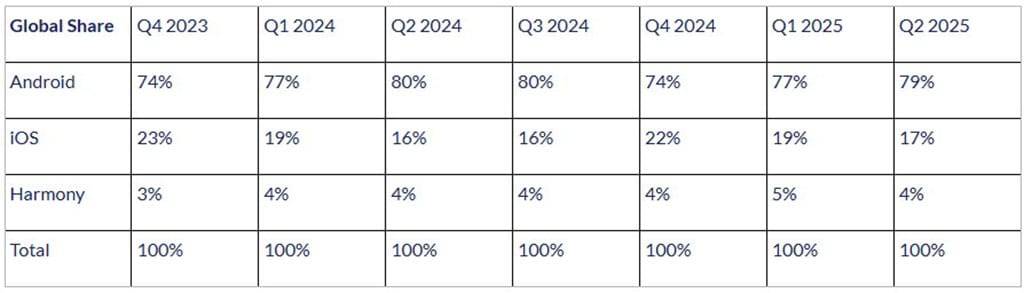
    With its proprietary HarmonyOS, Huawei is gaining ground in the mobile operating system market and has overtaken iOS in China for the sixth consecutive quarter. It now seeks to displace Android as the market leader for mobile operating systems.

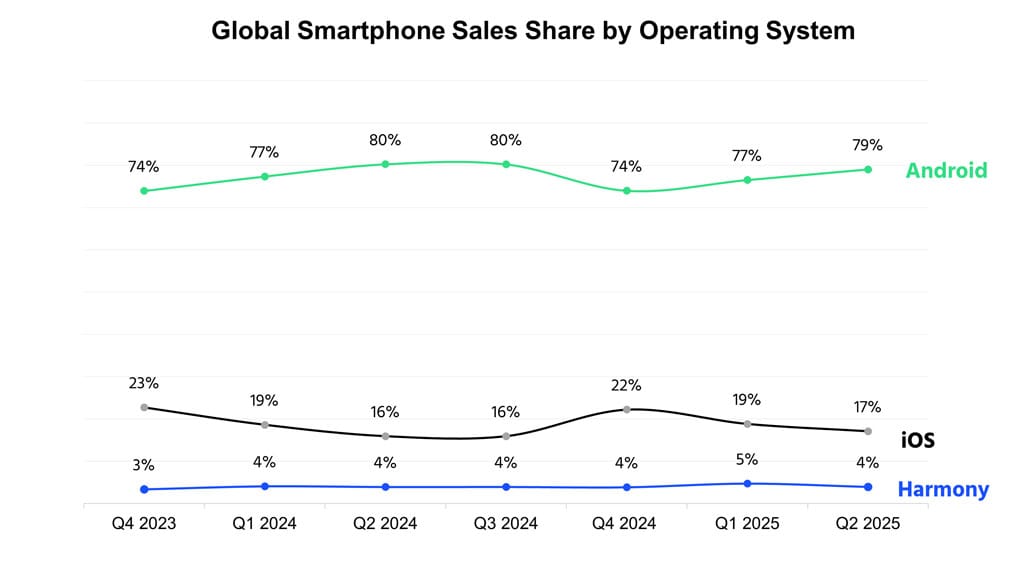
    At the moment, Android dominates the worldwide smartphone operating system market. Globally, it holds 79% of the shares. Huawei, however, intends to outperform this US-based competitor with its “NEXT” offering.

    According to the operating system report for Q2 2025, Counterpoint holds a share of the worldwide smartphone sales market. Despite gaining a sizable portion of the market, Android is losing ground in China as a result of HarmonyOS‘s quick ascent there.

    According to the research organization, Android is mostly restricted in China because of the escalating rivalry, and in India because of premiumization. However, the OS has been supported by companies like Vivo, Samsung, Motorola, and Honor during the quarter.

    For the 6th quarter, Huawei HarmonyOS stays ahead

    However, iOS also saw a 1% growth in its market share worldwide. It has performed admirably in a number of markets, including Brazil, the Middle East, and India.

    Because of the affordable iPhones and the recently released iOS 26 build version, iOS has also had the highest upgrade rate in the second quarter of this year.

    However, for the sixth straight quarter, Huawei’s HarmonyOS has pushed iOS further back in China. The legendary Pura X foldable and the latest Nova 14 versions deserve a lot of praise. Both models have attracted a lot of interest.

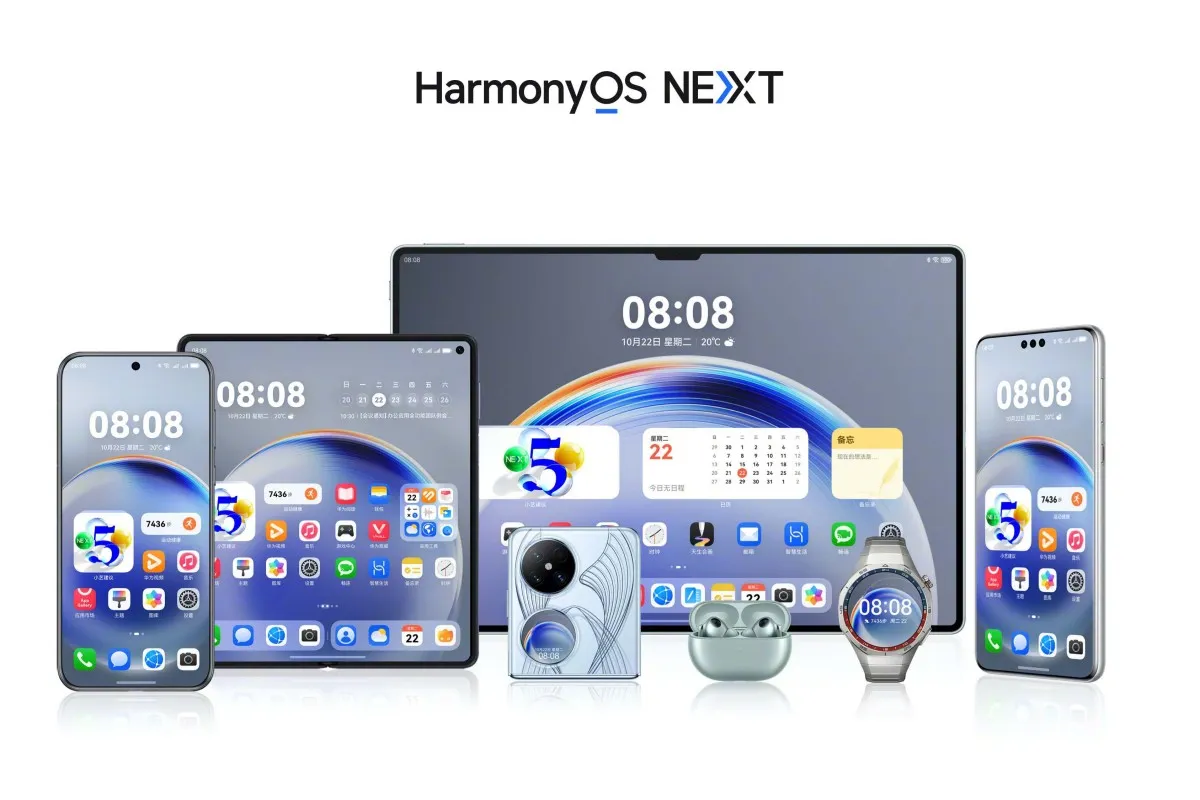
    The first device to release the stable HarmonyOS NEXT was the Pura X. Eye-tracking and a super Celia AI assistant were among the intriguing technologies it brought in.

    In order to provide a more dependable user experience, the Nova 14 series was the first conventional phone device to be pre-installed with the stable HarmonyOS 5.0.

    “HarmonyOS continues to grow in China and remains the second largest smartphone OS in the country for the sixth consecutive quarter. Huawei’s Nova series smartphones contributed heavily, and the foldable Pura X was also received well, keeping the brand competitive.” – said Counterpoint.

    Following this, Huawei plans to provide HarmonyOS 5.0 to the global market, initially with wearables and then with tablets. It would be interesting to observe when the operating system would overtake Android as the dominant player in the global smartphone market.

  • Premium apps free for a limited time on Android and iOS

    Premium apps free for a limited time on Android and iOS

    Users of iOS and Android, take note! You currently have the opportunity to download several premium apps for free. But act quickly—these amazing deals aren’t around for long, so take advantage of them before these apps revert to their premium editions.

    With a wide range of programs to suit all your needs, the Google Play Store and the Apple App Store are overflowing. Many of the alternatives are free, while some have a cost. The sporadic promotional events where a variety of paid apps are available for free download are sometimes overlooked. We’ve compiled a fascinating list of some of the most intriguing apps available for free at the moment.

    Even if you don’t require an app right away, install it if it piques your curiosity. It will be added to your app library and marked as “bought” as a result. After that, you may uninstall the app straight from your phone and get it back for free anytime you need it.

    android and ios apps

    Android

    Free Android Apps

    • DJ Music Mixer ($9.99): Have a bunch of MP3s or audio files on your phone and want to play DJ? Do so with this app!
    • Equalizer & Bass Booster Pro ($2.49): Get better-sounding audio from the software perspective with this app. Oh yes, a kick of bass doesn’t hurt, either.
    • Volume Booster & Sound Booster ($2.99): Just when you think that the music is not loud enough, this app comes to the rescue.
    • Clean Wave Water Eject Pro ($2.49): Even if your phone is waterproof or water resistant, why not remove unwanted water from its speaker area with this app that claims to do so? We have not tried it, so it’s your call! 

    Free Android Games

    • Brain App Daily Training ($7.99): Our brain is also an organ that would benefit from mental exercises, so why not give this game a spin?
    • Grow Zombie ($1.99): What kind of grotesque creation do you think you can come up with in this zany zombie-growing game?
    • Neo Monsters ($0.99): Collect monsters, train them, take care of them, send them out to fight, and watch them grow more powerful!
    • Heroes Legend: Epic Fantasy ($0.99): Train heroes up and equip them with better weapons and gear as you progress in the game to grow even more powerful. 
    • Sky Wings ($0.99): An intense, fast-paced shoot ’em up that is set in space. Do you have the reflexes to take down your enemies?

    iOS

    Free iOS Apps

    • Alarmix ($3.99): Waking up to a jarring alarm clock can be disturbing, but the good thing is that this alarm app does so gently.
    • Air ShareWifi File Transfer ($4.99): An easy way to transfer music, videos, documents, photos, heck—any files from the PC or Mac to an iOS device over Wi-Fi by simply dragging and dropping.
    • Bed Time Large Clock ($0.49): The regular clock doesn’t have a large enough font for you to see? Good thing there’s an app for that. 
    • iDousyn ($6.99): An app that transforms the iPhone or iPad into a professional music production powerhouse wherever you go, with its touch-based interface. 
    • The Jiu Jitsu Class Volume 1 ($19.99): While you cannot download kung-fu modules like Neo in The Matrix, you can still learn Jiu Jitsu from an app…

    Free iPhone games

    • Get Gabbin’ ($1.99): I guess this is more of a game, offering conversational topics so that no date or meet-up will be awkward, ever again.
    • Puffin Rock Music! ($1.99): An educational game for the little ones, where they embark on an adventure with a group of puffins and create their own music.
    • Pro Wrestling Manager ($3.99): Time to make a career out of wrestlers, as you manage them well and make them superstars.
    • Axion Run ($0.99): A game that tests your reflexes, as you try to break free from gravity in an intense competition with friends.
    • Sky Master ($0.99): A beautiful shoot ’em up that is set in space, where you take down enemy ships in intense space dogfights.

    Even if you don’t require an app right away, install it if it piques your curiosity. It will be added to your app library and marked as “bought” as a result. After that, you may uninstall the app straight from your phone and get it back for free anytime you need it.

    As of the date of publication, the deals were active. Please share any expired deals you come across in the comments section below.

    We advise you to review the app’s details in the Play Store or App Store before downloading any of the aforementioned apps. This is crucial as some of these free apps can offer unique features or drawbacks of their own.

    Both free and paid apps should be avoided since they could have unnoticed in-app purchases and adverts. This is especially important while downloading kid-friendly games.

  • Limited-time freebies: discover top Android & iOS apps at no cost

    Limited-time freebies: discover top Android & iOS apps at no cost

    In today’s bustling app marketplace, finding quality apps and games without having to dip into your wallet can feel like striking gold. Developers often run special promotions where normally paid apps become free for a short window—an opportunity savvy users love to seize. Whether it’s a powerful productivity app, a fun puzzle game, or a creative tool, these limited-time offers are perfect for anyone looking to expand their digital collection without the usual price tag.

    A carefully chosen list of currently available, totally free Android and iOS apps and games may be found in this page. Every selection has distinct qualities that appeal to a variety of interests; there is definitely something here for everyone. But, be careful to move quickly because these deals could end at any time, and you’ll have to pay again to get access to these treasures.

    Check out the newest limited-time freebies below and take advantage of these exclusive offers while they last if you enjoy finding fantastic games and helpful apps without having to pay for them.

    android and ios apps

    Android

    Free Android Apps

    • Mockup for Everything ($8.99): This is a powerful t-shirt design app that lets you come up with personalized designs on the move.
    • Resize Image ($0.99): If there ever arises the need to resize your photos on your phone, then this app gets the job done with minimal fuss.
    • Chess Position Scanner ($4.99): I have a terrible memory, and trying to memorize the different positions in chess is tough. Good thing there’s an app for that!
    • Stroop Effect Test ($3.49): Challenge your brain and mind constantly by keeping it on its toes. 
    • Shortcut Maker ($0.99): Always a nifty addition to any phone if you want to create shortcuts to apps on the fly.

    Free Android Games

    • Space Shooter: Galaxy Attack ($0.99): It all boils down to your reflexes and how you are able to shoot all the incoming alien ships to protect your world.
    • Word Tower PRO ($0.49): Keep on creating new words to protect your tower from crumbling.
    • Tech Quiz Master ($2.49): Think you know everything about technology? Why not pit your knowledge against this game?
    • Avalar: Raid of Shadow ($0.99): An adventure RPG where you explore new lands and level up as you progress.
    • Rectangles Pro ($1.49): This is a game that tests your logical skills as you identify and tap four dots of the same color that form any rectangular shape on the grid. Best of all, this game also works for those who are colorblind. Talk about being inclusive!

    iOS

    Free iOS Apps

    • Password Cube ($1.99): Store, generate, and manage your passwords with minimal fuss.
    • Skywall – Ultra HD+ Wallpapers ($1.99): If you have always wanted to spruce up your iPhone’s background with high-resolution wallpapers, this is it.
    • Dr. Pet Play ($1.99): Being more educational than a brain-rotting game for kids, I’d say this is worth checking out if your little one has shown interest in being a vet.
    • Guestbook Go ($7.99): A digital guestbook for social events that does not need your supervision as the host? Count me in, it allows your device to let your guests take photos with Photo Booth, record videos, answer questions in Quiz Show, and write/draw, 
    • Time Calculator+ ($0.99): Ever wondered how long ago a particular event happened from today? Well, instead of manually hashing out the answer, let this app do the heavy lifting for you. 

    Free iPhone games

    • Animal Math Kindergarten Games ($7.99): Sporting over 100 math games to help your little ones remain glued to the screen, it offers an educational aspect while playing.
    • Pro Wrestling Manager ($3.99): While it is true that sports wrestling entertainment is scripted, it is still fun to watch. How about managing your own wrestlers?
    • Cut the Buttons ($1.99): A classic game that never gets old, and if you’ve never played it before, now is a good time to start.
    • WordWhile ($1.99): Think you have a fantastic collection of quotes in your head? This game will put that knowledge to the test.
    • Castle Ramble ($1.99): You’re a king, you own a castle, but there are invading pigs whom you need to fend off with your larger-than-life hammer! 

    Before you get started, a little reminder: Although these games and apps are free to download for a short period of time, keep in mind that some of them might have advertisements or require extra in-app purchases to unlock premium features or remove adverts. Although some features can improve your experience, using them may incur additional fees.

    To ensure you know exactly what to expect, always take a moment to check the program’s permissions and details in the app store. You can get the most out of your new apps and games and enjoy these free downloads without any unpleasant surprises if you keep an eye out for any potential advertisements or optional payments.

  • Temporary free apps for iOS and Android

    Temporary free apps for iOS and Android

    We occasionally choose an intriguing selection of apps for fans of both Android and iPhone, which are often paid for but are currently accessible for free for a little period of time. Take advantage of these amazing discounts on games and apps to expand your device’s app library—just make sure to act quickly!

    We cannot guarantee how long these promotions will remain available on the Google Play Store or Apple App Store, so please keep in mind that they are just temporary. Therefore, it’s best to grab them while you can. Just a gentle warning to be mindful of any potential membership commitments, in-app purchases, and adverts that may accompany them.

    android and ios apps

    Even if you don’t require an app right away, install it if it piques your curiosity. It will be added to your app library and marked as “bought” as a result. After that, you may uninstall the app straight from your phone and get it back for free anytime you need it.

    Android Apps and Games

    Android Apps

    • Clock Widget ($0.99): Want to have the time told in words? This widget should do a decent job.
    • TriSolve ($0.99): See math from a different angle (heh!) with this app that helps calculate all things triangles for you.
    • QR and Barcode Scanner ($5.99): Here is a QR reader and barcode scanner code app that will make your life convenient. 
    • DogTok ($2.99): This app claims to be able to help you interact with your dog, but don’t expect to have heart-to-heart conversations with your furkid anytime soon.

    Android Games

    • Undead City: Survivor Premium ($0.99): You are a hero with many skills, and have a city full of hapless people to defend from waves of zombies. Can you do it?
    • Zombie Age 3 ($0.99): The zombie apocalypse is upon you, and you will need to have all your wits with you to survive.
    • Monster Killer Pro Shooter ($0.49): Choose from different characters with varying abilities to shoot monsters from a top-down perspective.
    • Live or Die: Survival Pro ($0.99): It is up to your wits and wisdom to survive an unforgiving environment.
    • Everybody’s RPG ($0.49): Go around, adventurer, recruiting more powerful heroes as you progress in the game to conquer new lands and defeat more dangerous enemies.

    iOS Apps and Games

    iOS Apps

    • Stickyboard 2 ($4.99): Imagine a giant board that lets you play with an unlimited number of sticky notes!
    • Breastfeeding Central ($1.99): A personal breastfeeding helper that you can ‘summon’ regardless of the time of the day (or night!) as it provides you with tips and tricks.
    • Amsterdam Audio Stories ($8.99): Walk through Amsterdam without actually being there, reliving the stories told over your headphones. 
    • Type Freely ($4.99): This app lets you get all your texts written freely, professionally, and shared as an HD image on social media.
    • Pool Calculator ($4.99): If you need help with calculations for your swimming pool or hot tub chemistry maintenance, then this app helps get the right balance on things.

    iPhone games

    • Word Search Creator ($0.99): Looking for a way to engage your audience? Why not come up with your own word search puzzle?
    • Color Lines 98 Bubbles Classic ($1.99): Connect color balls in a row to progress to the next level.
    • DEEMO ($1.99): A mobile rhythm game that requires you to have impeccable timing and a sense of rhythm.
    • Dead Rails ($6.99): If you love railroad networks, then how about navigating a train yourself through intricate rail networks while transporting passengers?
    • Tables – Multiplication Drills ($0.99): I have always been an advocate for practice makes perfect in math, and the same applies when it comes to mastering multiplication.

    We advise you to review the app’s details in the Play Store or App Store before downloading any of the aforementioned apps. This is crucial since some of these free apps can have unique features or drawbacks of their own.

    Both free and paid apps should be avoided since they could have unnoticed in-app purchases and adverts. This is especially important while downloading kid-friendly games.

    In the rapidly evolving world of mobile apps, several companies use cunning tactics to obtain your personal information. But tech buffs, don’t worry! We’ve compiled some crucial advice to help you safeguard your important data. Being selective about the permissions you grant the apps you decide to install is an essential first step.

  • This week’s Android and iOS temporarily free apps

    This week’s Android and iOS temporarily free apps

    Searching for the most amazing offers without breaking the bank? Each week, premium apps and games are available for free download for a brief period of time on both the Apple App Store and the Google Play Store. Whether you enjoy immersive games, lifestyle apps, or productivity tools, these short-lived sales are the ideal way to add to your collection without breaking the bank.

    The most recent free applications and games for iOS and Android are highlighted in this roundup. It’s a good idea to take advantage of these time-sensitive bargains before they revert back to their normal pricing. We’ll update the list frequently, so you won’t ever miss out on special offers for your preferred mobile devices.

    google play store apps

    Android apps and games

    Apps

    • English Verbs Pro ($3.99): If you want to up your verb game in English, this app will help nudge you forward.
    • Sharks 3D ($0.99): Want a live wallpaper without having to go to the aquarium? See sharks swimming around.
    • Color Wheel ($1.99): Any graphic designer or artist would definitely want to have this app at their disposal in selecting the most accurate color possible.
    • Rotation Control ($0.99): I guess this is useful for older devices that do not have built-in rotation controls.
    • 3D Anatomy ($2.99): This looks like a rather nifty app to help people get familiar with the human anatomy.

    Games

    • SPHAZE ($0.99): A sci-fi puzzle game that tickles your imagination while featuring great-looking graphics.
    • Empire Warriors: Tower Defense ($0.99): A tower defense game with cartoonish graphics that will surely keep you peeled.
    • Survival Island: Evolve Pro ($0.49): You’re marooned on an island and need to make sure you can do the necessary to remain alive.
    • Word Connect Crossword ($2.99): If you love words, then this crossword variant will keep you entertained. 

    iOS apps and games

    Apps

    • Haplo AI ($4.99): An offline chat AI that keeps your conversations private.
    • 3D Anatomy ($2.99): If you’re curious to get up close and personal with the human anatomy, then this app can help.
    • Sprite Pencil ($1.99): Come up with amazing pixel art using this app, although some patience is required. 
    • Magic Emoji ($1.99): You can call this an emoji kitchen, where various emojis can be merged to create a new one.

    Games

    • Peg Pals Pro ($1.99): A fast yet relaxing puzzle game that will keep your brain occupied during pockets of idle time.
    • Animal Math Games School Ed ($12.99): A game for the little ones who want to pick up math.
    • Cypher Vocab ($0.99): A GRE vocabulary game to help build up your word power. 
    • Fiete Choice ($2.99): Want to keep your little ones occupied? This game will garner their attention.

    The deals were active on the day of publication. Please leave a comment below if you come across an expired deal.

    Before downloading any of the aforementioned apps, we advise you to review the app’s details in the App Store or Play Store. Because some of these free programs might offer unique features or drawbacks of their own, this is crucial.

    Both free and paid apps should be avoided since they could have unnoticed in-app purchases and adverts. This is especially important while downloading kid-friendly games. In the rapidly evolving world of mobile apps, numerous companies use cunning tactics to obtain your personal information. But tech buffs, don’t worry! We’ve compiled some crucial advice to help you safeguard your important data. Being selective about the permissions you grant the apps you decide to install is an essential first step.

    Discover the wide range of free apps that are accessible on the iOS and Android operating systems, all while protecting your data.

  • Update Now! the fix for critical WhatsApp bug that allows hackers to spy on iPhones is live

    Update Now! the fix for critical WhatsApp bug that allows hackers to spy on iPhones is live

    You should be aware that not everyone using WhatsApp is safe. Meta has alerted users to a significant security vulnerability that hackers used to launch a sophisticated, focused malware campaign that compromised dozens of WhatsApp accounts. This is why it’s important and why you should upgrade the app right now.

    In order to fix a vulnerability that was exploited in conjunction with another weakness in Apple devices, WhatsApp declared on Friday that it has released an emergency patch for its messaging program on iOS and Mac. According to reports, a week before WhatsApp’s upgrade, Apple resolved the security flaw in its devices.

    whatsapp bug fix

    Why is this so dangerous?

    Hackers reportedly used a well-known zero-click attack—a technique that compromises a device without requiring user interaction—to successfully exploit both vulnerabilities. In certain situations, a victim might get a link or image from an attacker, who might then take control of the device and run malicious code to spy on or steal private data without the victim having to click.

    Meta acknowledged notifying dozens of people it thought were the campaign’s target. A copy of the alert message, which detailed the reason for the warning and the next steps, was posted on X by the head of the security company Amnesty Tech. The notification suggested that victims reset their device to factory defaults.

    We’ve made changes to prevent this specific attack from occurring through WhatsApp. However, your device’s operating system could remain compromised by the malware or targeted in other ways.
    To best protect yourself, we recommend a full device factory reset. We also strongly urge you to keep your devices updated to the latest version of the operating system, and ensure that your WhatsApp app is up to date.

    Meta

    These kinds of advertisements have already targeted WhatsApp users. Similar zero-day exploits have been connected in the past to monitoring operations targeting prominent people, such as journalists and politicians.

    What should you do to be safe?

    Even though only a small percentage of WhatsApp users were impacted, others should still be concerned about this attack. Installing the most recent security update for your Apple device and updating WhatsApp on your Mac and iPhone are highly advised.

    Even while Android users aren’t being targeted by this operation, they could still be at risk due to the same WhatsApp flaws. They should also install the most recent Android security patch and update to the most recent version of WhatsApp. Users who believe they may be in danger can manually activate new features like Advanced Device Protection, which provide an additional layer of security.