Droid ToolsDroid ToolsDroid Tools
  • Home
  • News
  • Apps
  • Devices
  • OS
  • Guides
  • Code
  • |
  • Deals
Reading: Same WhatsApp account on two phones – guide
Share
Notification
Font ResizerAa
Droid ToolsDroid Tools
Font ResizerAa
  • Home
  • News
  • Apps
  • Devices
  • OS
  • Guides
  • Code
  • |
  • Deals
Search
  • Home
  • News
  • Apps
  • Devices
  • OS
  • Guides
  • Code
  • |
  • Deals
Have an existing account? Sign In
Follow US
Droid Tools > Guides > Same WhatsApp account on two phones – guide

Same WhatsApp account on two phones – guide

Guides
Share
5 Min Read
WhatsApp Multi Device 2
SHARE

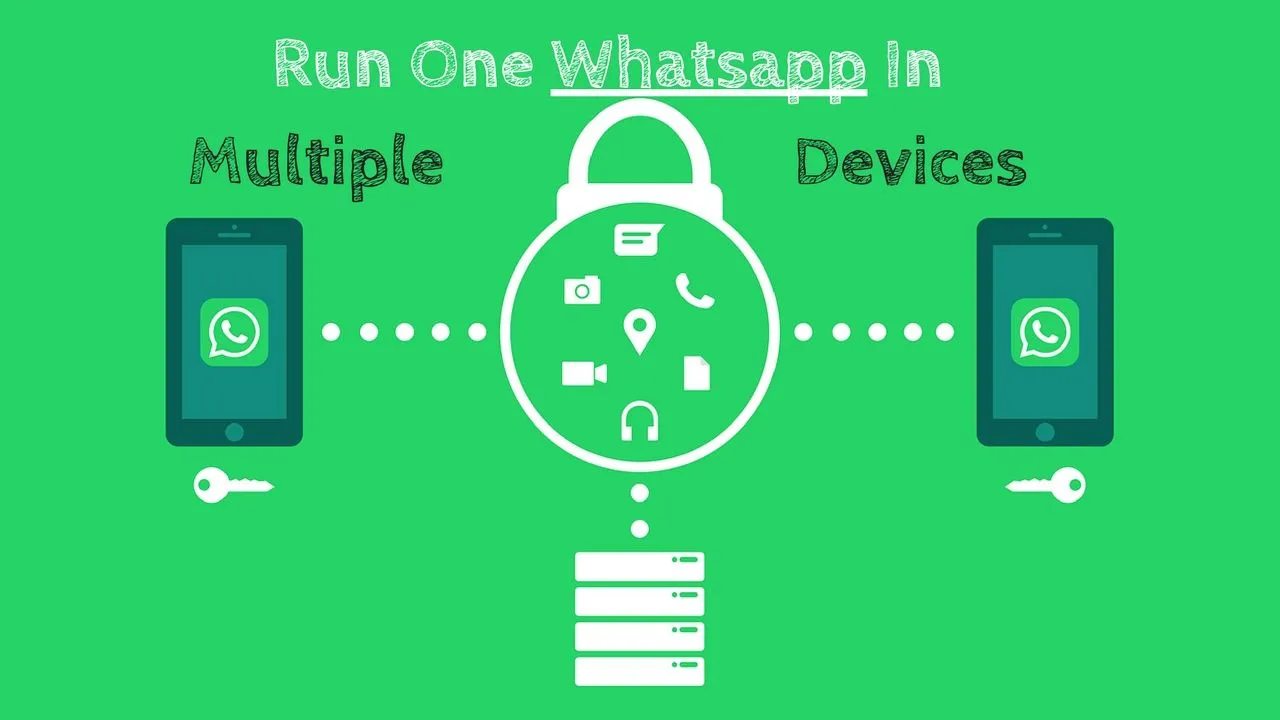
Hell has turned to ice. Finally, you can use the same WhatsApp account on two different phones. It takes a little getting used to at first, but the important thing is that it works.

The ability to link your existing account to an Android tablet has just been available on WhatsApp (in beta). When setting up the app on your Android tablet if you have version 2.22.25.8 beta installed on both your Android phone and tablet, you should have the option to scan the QR code. This is essentially the same as using WhatsApp on Windows or Mac right now; while your phone continues to be the primary device, your secondary devices are somewhat independent and can continue to function even if your primary phone is offline.

This new Android tablet process works on phones too, but you have to briefly trick WhatsApp into thinking your second phone is a tablet.

1: Ensure your primary phone has WhatsApp v2.22.25.8 beta installed, signed in, and working. If you’re running an older version of the app, you can grab the APK file from APKMirror. (It’s a trusted source, don’t worry about malware.)
More News

WhatsApp no number
WhatsApp make it easier to start chats with unsaved numbers
Change how notifications are displayed on Android lockscreen
Google Messages removes nav drawer in the new redesign
How to increase RAM using virtual memory (Android 13+)
Phone app getting the new Material 3 Expressive

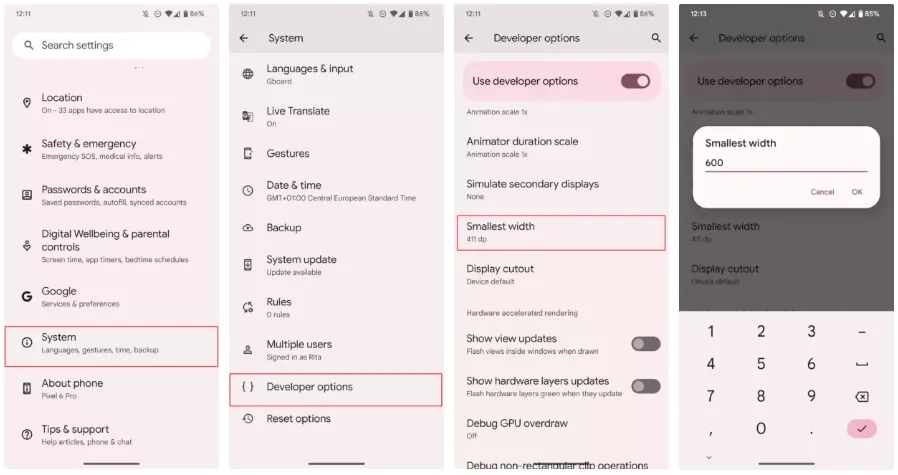
2: On your second phone, you start by enabling Developer Options in Android’s main settings. (Go to Settings > About phone and tap multiple times on Build number until you see a pop-up that says You are now a developer.)
whatsapp multiple account

3: Stay on the second phone. Go to Settings > System > Developer options > Smallest width. You can use the search option if you don’t find it. Note down the current number (you’ll need it to revert later), then change it to 600. This will transform your phone’s interface into a tablet interface. Fonts and icons will be smaller, but we’ll return to the regular sizes, don’t worry. On my Pixel 6 Pro, which runs Android 13, I get the taskbar at the bottom for example. Fun stuff.

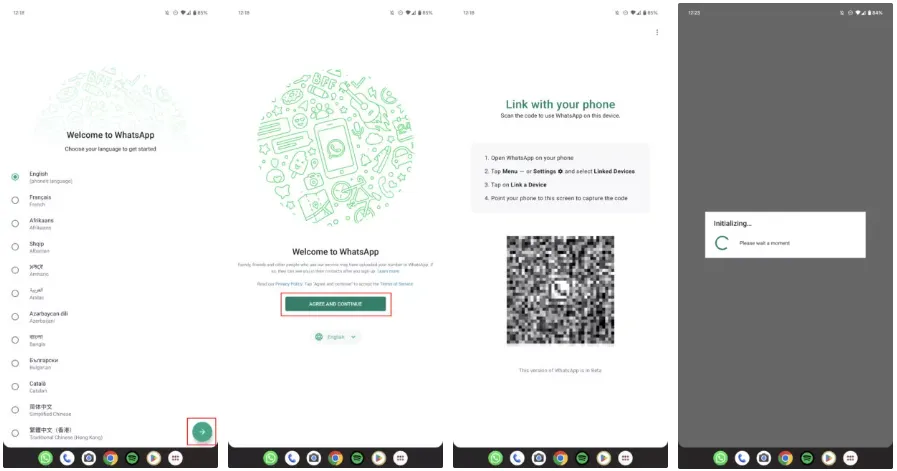
4: Now install WhatsApp v2.22.25.8 on this second phone. Again, you can do this from the Play Store if you’re enrolled in the beta or you can manually grab the same APK from APKMirror.
whatsapp on tablet

5: Open WhatsApp, choose the language, tap Agree and continue, and you should see the Link with your phone screen with your unique QR code. (If you see the page where you’re asked to sign in with a phone number, it means your phone wasn’t tricked into “becoming” a tablet. Try a higher number for the Smallest width setting. But 600 should do it, in theory.)
whatsapp on multiple devices

6: Go back to your main phone now. Open WhatsApp, tap the overflow ⋮ button on the top right, then Linked devices > Link a device. This will bring up the QR code scanner, so scan the code that was displayed on the second phone. And ta-da. Your second phone should reload WhatsApp with the same account as your primary device.

7: If you don’t like the tablet interface and small fonts on your second phone, you can repeat Step 3 and go back to the original Smallest width setting. WhatsApp will remain linked to your account.

There it is, then. Messages, calls, and pretty much everything else will be delivered to both smartphones. Both allow you to start calls and chats. A message is marked as read on one if you read it, and vice versa.

Your primary phone is still in charge and the one that has the ability to delink the second device if necessary. The desktop version of this needs to refresh every so often if you haven’t used it in a while, and I haven’t used it long enough to notice if there is any slowness or delay in grabbing messages like in that version. But it appears that’s not a problem right now.
Google Pixel Watch 3 (45mm)

Google Pixel Watch 3 (45mm)

The Google Pixel Watch 3 is designed for performance, with advanced fitness from Fitbit; the 45mm screen is twice as bright and 40% larger than…
$299.99 $249.99 17% OFF on Amazon
Samsung Galaxy Watch 7

Samsung Galaxy Watch 7

Looking for a great way to bring out your personal best every day? Challenge yourself to excel on your next run or bike ride using…
$249.99 $149.99 40% OFF on Amazon
TAGGED:accountappmultipledevicewhatsapp
Share This Article
Facebook Copy Link Print
Share
Previous Article imessage on android Sunbird – brings iMessage on Android
Next Article galaxy s20 series December security update rollout for Samsung Galaxy S20 series
Leave a Comment Leave a Comment

Leave a Reply Cancel reply

Your email address will not be published. Required fields are marked *


Follow US
FacebookLike
XFollow
PinterestPin
InstagramFollow
TelegramFollow
Google NewsFollow
- Advertisement -
Black friday week #deals: Galaxy Watch 8 from $280, Z Fold 7 $400 off
Huge Amazon deal: Samsung drops Galaxy Watch 7 price by almost half
Pixel Watch 4: battery life takes center stage
Best Google Pixel Watch 4 alternatives you can buy right now
Honor Magic 8 Pro hands-on: premium design, powerful performance
- Advertisement -
- Advertisement -
xiaomi 17 ultra camera details

Xiaomi 17 Ultra Leica Leitzphone Edition was listed in GSMA database

Mobile Banking android Malware

Dangerous Android malware quietly targets and empties bank accounts

MiSecurity

Xiaomi rolls out major Security V12 update with improved Game Turbo

google pixel software update dashboard qpr1 beta 2 e1764873493280

Android 16 December update brings major upgrades to Google Pixel devices

google maps debuts new battery saver mode for pixel 10 phone gkzv

This hidden Pixel feature can significantly boost battery life

Xiaomi 14 Ultra review 2

Xiaomi 14 Ultra to receive HyperOS 3 update — main features detailed

Droid Tools

Droid Tools provides Android users with the latest tools and resources to enhance their mobile experience.

Categories

  • News
  • Devices
  • Apps
  • OS
  • Guides
  • Code

Navigate

  • Privacy Policy
  • Terms of Use
  • Affiliate Disclosure
Droid Tools

Information you can trust: Reuters, the news and media division of Thomson Reuters, is the world’s largest multimedia news provider, reaching billions of people worldwide every day, Sign up for our free daily newsletter: thomson@reutersmarkets.com